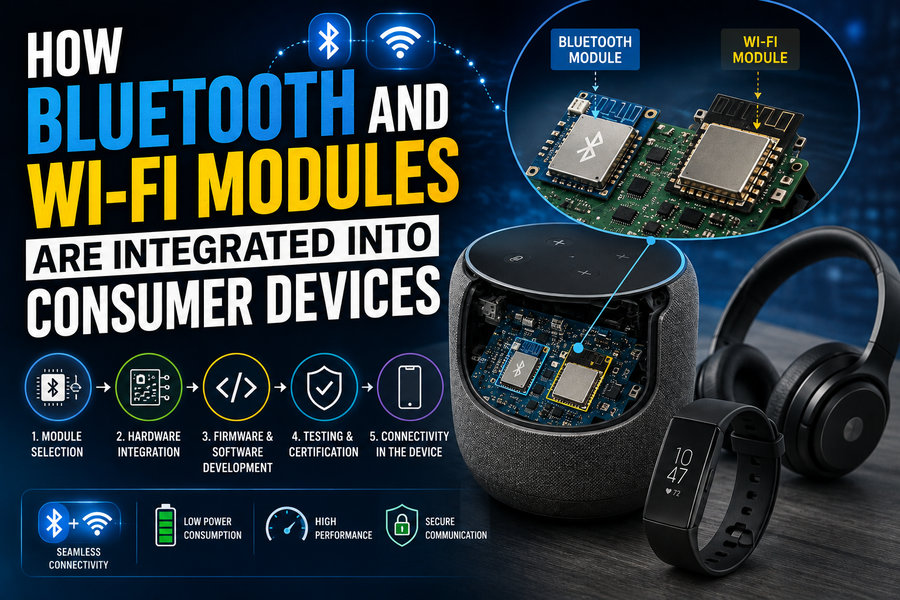

Modern consumer electronics are expected to be connected almost everywhere. Smartphones sync with earbuds, smart TVs stream video, watches communicate with phones, security cameras send footage to the cloud, and home appliances can be controlled remotely. Much of this connectivity depends on two familiar wireless technologies: Bluetooth and Wi-Fi. 📡🌐
Yet these capabilities do not simply appear because a manufacturer installs an antenna. Inside every connected device is a carefully engineered combination of wireless chips, radio-frequency circuitry, antennas, power systems, firmware, drivers, operating-system software, and security components.
In some products, Bluetooth and Wi-Fi are implemented using separate chips. In others, both technologies are integrated into a single wireless module or system-on-chip. The choice depends on the device’s size, battery requirements, performance goals, cost, and intended use.
Understanding how these wireless modules are integrated provides a fascinating look inside the electronics that power modern connected devices. 🔬📱
📡 What Is a Bluetooth or Wi-Fi Module?
A wireless module is a compact electronic assembly designed to provide radio communication capabilities.
A typical module may contain:
- A Bluetooth radio
- A Wi-Fi radio
- A microcontroller or processor
- Radio-frequency amplifiers
- Oscillators
- Memory
- Power-management circuitry
- Antenna connections
- Firmware
Some modules include the antenna directly on the small circuit board.
Others provide an RF connector or antenna pin so the device manufacturer can connect a custom antenna elsewhere inside the product.
Wireless modules simplify product development because many complex radio functions are already integrated.
Instead of designing every RF component from scratch, engineers can incorporate a pre-designed wireless platform into the larger device.
🧠 Bluetooth and Wi-Fi Serve Different Purposes
Although both use radio communication, Bluetooth and Wi-Fi are optimized for different jobs.
🔵 Bluetooth
Bluetooth is commonly used for short-range communication between nearby devices.
Typical applications include:
🎧 Wireless headphones
⌚ Smartwatches
⌨️ Keyboards
🖱️ Computer mice
🚗 Vehicle accessories
🩺 Health sensors
Bluetooth is particularly useful when low power consumption is important.
Bluetooth Low Energy, often called BLE, is widely used in battery-powered products that need to exchange relatively small amounts of data.
📶 Wi-Fi
Wi-Fi is designed for much higher-speed network communication.
It is commonly used for:
📺 Video streaming
💻 Internet access
📷 Security cameras
🎮 Gaming devices
🏠 Smart-home hubs
☁️ Cloud connectivity
Wi-Fi usually consumes more power than Bluetooth, but it can transfer far greater amounts of data.
Many consumer devices therefore use both technologies.
Bluetooth may handle nearby device pairing, while Wi-Fi provides high-speed internet access.
🔗 1. The Wireless Chip Connects to the Main Processor
At the heart of most consumer devices is a main processor.
This may be:
- A smartphone application processor
- A television system-on-chip
- A microcontroller
- An embedded Linux processor
- A dedicated appliance controller
The Bluetooth or Wi-Fi hardware must communicate with this processor.
Common electrical interfaces include:
🔌 USB
Some Wi-Fi modules communicate through USB.
This approach is common in computers, embedded boards, and certain consumer devices.
📡 SDIO
Secure Digital Input Output, or SDIO, is frequently used to connect Wi-Fi chipsets to embedded processors.
It provides relatively high-speed communication while requiring fewer pins than some parallel interfaces.
🔄 UART
Bluetooth modules often use UART, a serial communication interface.
This is especially common when the Bluetooth controller handles much of its own protocol processing.
⚙️ SPI
The Serial Peripheral Interface, or SPI, can also connect wireless modules to microcontrollers.
The selected interface depends on bandwidth, processor support, power consumption, and cost.
🧩 2. Many Devices Use Combo Wireless Chips
Instead of installing separate Bluetooth and Wi-Fi chips, manufacturers often use a combo module.
A single package may contain:
Wi-Fi + Bluetooth + shared RF circuitry
This offers several advantages.
It can reduce:
📏 Circuit-board space
💰 Component cost
⚡ Power consumption
🔩 Assembly complexity
Combo chips are particularly useful inside smartphones, tablets, laptops, televisions, and compact smart-home products.
However, integrating multiple radios into a small area creates another challenge: radio coexistence.
📡 3. Bluetooth and Wi-Fi Can Interfere With Each Other
Bluetooth and some Wi-Fi connections operate in the 2.4 GHz radio band.
This means both radios may try to use nearby frequencies at the same time.
Imagine streaming video over Wi-Fi while simultaneously sending audio to Bluetooth headphones.
Without coordination, the radios could interfere with each other.
Modern combo chipsets use coexistence mechanisms to reduce this problem.
The Bluetooth and Wi-Fi controllers can coordinate transmission timing.
For example:
📶 Wi-Fi pauses briefly
🔵 Bluetooth transmits
📶 Wi-Fi resumes
These decisions happen extremely quickly.
More advanced systems consider traffic priority, signal conditions, and application requirements.
This makes it possible for users to stream online video while using Bluetooth audio without noticing the complex radio coordination occurring inside the device.
📶 4. Antenna Design Is Critical
A wireless chip is useless without an effective antenna.
The antenna converts electrical radio-frequency signals into electromagnetic waves and converts received waves back into electrical signals.
Consumer-device antennas may take several forms:
- Printed circuit-board antennas
- Flexible antennas
- Ceramic chip antennas
- Metal frame antennas
- External antennas
Smartphones often contain multiple antennas distributed around the enclosure.
Routers may use several larger external or internal antennas.
Small IoT devices may use a tiny antenna printed directly onto the circuit board.
📐 Why Antenna Placement Matters
Radio waves interact with surrounding materials.
A poorly placed antenna may be blocked by:
🔋 Batteries
🧱 Metal enclosures
🖥️ Displays
🔩 Internal shielding
🧑 Human hands
This means antenna placement is one of the most important parts of wireless product design.
A metal housing can significantly affect radio performance.
Engineers may leave small nonmetallic sections of the enclosure near antennas or design specialized antenna structures around the metal frame.
A smartphone’s antenna system is therefore closely connected to the physical design of the entire device.
🧲 5. RF Front-End Components Prepare the Radio Signal
Between the wireless chip and antenna sits an important group of circuits called the RF front end.
RF stands for radio frequency.
The RF front end may include:
- Filters
- Power amplifiers
- Low-noise amplifiers
- Switches
- Matching networks
- Diplexers
Each performs a specific job.
🔊 Power Amplifier
When transmitting, a power amplifier increases the strength of the radio signal before it reaches the antenna.
👂 Low-Noise Amplifier
When receiving, a low-noise amplifier boosts weak incoming signals while trying to add as little electrical noise as possible.
🔍 Filters
Filters prevent unwanted frequencies from entering or leaving the radio system.
This is essential because consumer devices often contain many radios operating close together.
A smartphone may support:
📶 Wi-Fi
🔵 Bluetooth
📱 Cellular networks
🛰️ GNSS positioning
📡 NFC
Without careful filtering, these systems could interfere with each other.
⚡ 6. Power Management Is Essential
Wireless radios consume electricity.
For a smartphone, smartwatch, or wireless sensor, battery life is extremely important.
Engineers therefore design wireless systems to spend as little time as possible operating at full power.
Bluetooth Low Energy devices may remain asleep for long periods.
The sequence might look like:
😴 Sleep
📡 Wake briefly
📨 Send data
👂 Listen for response
😴 Return to sleep
This can allow small sensors to operate for months or even years on a small battery.
Wi-Fi requires more power, especially during continuous data transfer.
Modern devices therefore use aggressive power-saving techniques.
A phone may turn certain wireless circuits off when they are not needed and wake them only when network activity occurs.
🧠 7. Firmware Controls the Wireless Hardware
Hardware alone does not create a functioning wireless connection.
The wireless chip contains or runs firmware.
Firmware manages low-level radio operations such as:
- Channel selection
- Timing
- Packet transmission
- Error handling
- Power states
- Security functions
Manufacturers may periodically update wireless firmware to:
🛠️ Fix bugs
🔐 Patch security vulnerabilities
📶 Improve connectivity
⚡ Reduce power consumption
In many consumer devices, firmware updates are delivered automatically as part of a larger operating-system or device update.
💻 8. Device Drivers Connect Hardware to Software
The operating system needs a way to communicate with the wireless hardware.
This is the job of a device driver.
Drivers translate commands between the operating system and the wireless module.
For example, when a laptop user clicks a Wi-Fi network name, the operating system asks the Wi-Fi driver to:
- Scan available networks
- Select the correct network
- Authenticate
- Establish encryption
- Create the network connection
The user sees only a few buttons.
Behind the scenes, hundreds of technical operations may occur.
🔐 9. Security Is Built Into the Wireless Stack
Wireless communication must be protected from unauthorized access.
Wi-Fi networks use encryption and authentication mechanisms to prevent other users from casually reading traffic or joining protected networks.
Bluetooth also uses security procedures for pairing devices.
During Bluetooth pairing, devices may establish shared encryption keys.
The exact method depends on the device type and Bluetooth implementation.
For example:
🎧 Earbuds may use simplified pairing
⌨️ Keyboards may require confirmation
🚗 Vehicle systems may display codes
⌚ Wearables may authenticate through companion apps
Good wireless security depends not only on radio encryption but also on secure software, firmware updates, access controls, and proper device configuration.
🔵 10. Bluetooth Profiles Define Device Behavior
Bluetooth does not simply connect two devices and leave them to figure out what to do.
The technology uses standardized profiles.
A profile defines how devices communicate for a particular purpose.
Examples include profiles for:
🎧 Audio
⌨️ Human-interface devices
📞 Hands-free communication
❤️ Health information
This allows products made by different manufacturers to communicate using common rules.
A Bluetooth headset from one company can therefore work with phones from many different brands.
📱 11. Bluetooth Low Energy Uses Services and Characteristics
BLE devices frequently organize information using services and characteristics.
Imagine a smart thermometer.
It might provide:
Temperature Service
↳ Current temperature
↳ Measurement unit
↳ Battery status
A smartphone application can read those values through standardized or manufacturer-defined BLE structures.
This architecture makes Bluetooth Low Energy particularly useful for sensors and IoT products.
🌐 12. Wi-Fi Gives Devices Internet Connectivity
Bluetooth generally focuses on nearby device-to-device communication.
Wi-Fi commonly connects a device to a local network and then to the internet.
A smart thermostat, for example, may connect to:
Thermostat → Wi-Fi router → Internet → Cloud server → Smartphone app
This allows users to control the thermostat even when they are away from home.
The device typically receives a local network address and communicates using standard internet protocols.
☁️ 13. Many Consumer Devices Depend on Cloud Services
Wireless connectivity often serves as the bridge between physical hardware and cloud platforms.
Consider a smart security camera.
Its internal architecture may include:
📷 Image sensor
🧠 Processor
📶 Wi-Fi module
☁️ Cloud connection
📱 Mobile application
The camera captures video, compresses it, and sends data through Wi-Fi.
Cloud servers may then:
- Store recordings
- Send notifications
- Analyze motion
- Enable remote viewing
Without Wi-Fi, many modern smart-home products would lose much of their remote functionality.
🏠 14. Bluetooth Can Help Configure Wi-Fi
Many smart-home products use an interesting combination of both technologies.
Imagine installing a smart light.
Initially, the light does not know the password for your home Wi-Fi network.
A common setup process is:
- 📱 Smartphone discovers light through Bluetooth
- 🔵 Bluetooth creates a nearby connection
- 🔐 User selects home Wi-Fi network
- 📲 Phone securely sends configuration details
- 📶 Light connects to Wi-Fi
- ☁️ Device registers with cloud service
Bluetooth acts as the temporary setup channel.
Wi-Fi becomes the long-term network connection.
This method simplifies installation because the product does not need a keyboard or display.
🖥️ 15. Circuit-Board Layout Has a Major Effect
Wireless design is highly sensitive to circuit-board layout.
Radio-frequency signals behave differently from ordinary low-frequency digital signals.
Engineers must carefully design:
- RF trace lengths
- Ground planes
- Antenna clearances
- Component placement
- Power filtering
A badly designed PCB can reduce wireless range even if the wireless chipset itself is excellent.
High-frequency traces must often maintain a specific electrical impedance.
This requires precise control of circuit-board geometry.
RF engineering is therefore a specialized part of consumer-electronics development.
🛡️ 16. Electromagnetic Interference Must Be Controlled
Electronic circuits naturally generate electromagnetic noise.
Processors, displays, memory chips, switching power supplies, and motors can all interfere with radio systems.
Similarly, wireless transmitters can interfere with sensitive circuits elsewhere inside a device.
Engineers use techniques such as:
🧱 Metal shielding
🔍 RF filtering
🌍 Proper grounding
📐 Careful board layout
📏 Physical separation
to control electromagnetic interference.
Products must also meet electromagnetic compatibility requirements before being sold in many markets.
🧪 17. Wireless Products Require Extensive Testing
Before a consumer product reaches stores, manufacturers perform many types of wireless testing.
Testing may evaluate:
📶 Signal strength
📡 Receiver sensitivity
⚡ Transmit power
🔋 Power consumption
🔐 Security behavior
🌡️ Performance at different temperatures
Engineers also test the device in different physical orientations.
This is especially important for smartphones and wearable devices because the user’s body can affect antenna performance.
A product may work perfectly on an engineering bench but behave differently when held in a person’s hand.
📜 18. Wireless Devices Must Meet Regulatory Requirements
Radio transmitters cannot simply operate at any frequency or power level.
Governments regulate radio-frequency use to prevent harmful interference.
Consumer devices therefore undergo regulatory testing before they can be legally marketed in many countries.
Requirements may address:
- Allowed frequencies
- Maximum transmitter power
- Unwanted emissions
- Electromagnetic compatibility
- Human RF exposure
Wireless technologies also need to conform to relevant technical standards and certification programs.
This ensures that devices from different manufacturers can communicate correctly and operate safely within shared radio spectrum.
🏭 19. Why Manufacturers Sometimes Buy Complete Modules
Designing a wireless radio from individual components is complicated.
Smaller electronics companies may therefore purchase a certified wireless module.
A module can include:
📡 Radio chipset
🧠 Processor
🧲 RF components
🔐 Firmware
📶 Antenna
The manufacturer then connects it to the main device.
This approach can reduce:
💰 Development cost
🕒 Engineering time
🧪 RF design complexity
It may also simplify portions of regulatory certification, depending on the product and jurisdiction.
Large companies producing millions of devices may instead design highly customized wireless systems to optimize size, performance, and cost.
📏 20. Integration Becomes Harder as Devices Get Smaller
Wireless earbuds provide an excellent example.
Inside an extremely small enclosure, engineers must fit:
🔵 Bluetooth radio
🔋 Battery
🔊 Speaker driver
🎤 Microphones
🧠 Audio processor
📡 Antenna
The human ear and head can also absorb or alter radio energy.
This makes antenna placement difficult.
Engineers must achieve good wireless performance without making the earbud larger or reducing battery capacity.
Small wearable electronics therefore represent some of the most challenging wireless-integration projects.
🚗 Bluetooth and Wi-Fi in Vehicles
Modern vehicles can contain multiple wireless systems.
Bluetooth may connect:
📱 Smartphones
🎵 Audio streaming
📞 Hands-free calls
Wi-Fi may provide:
🌐 Passenger hotspots
⬇️ Software updates
📺 Entertainment connectivity
Vehicles are difficult RF environments because their bodies contain large quantities of metal.
Engineers carefully position antennas and may use different antennas for different frequency bands.
Wireless reliability is particularly important because vehicles may operate in extremely hot or cold environments.
📺 Bluetooth and Wi-Fi in Smart TVs
Smart TVs provide another good example of dual wireless integration.
Wi-Fi handles high-bandwidth activities such as:
🎬 Streaming movies
📺 Live internet television
⬇️ Software updates
Bluetooth may connect:
🎧 Wireless headphones
🎮 Game controllers
⌨️ Keyboards
🔊 Speakers
Using both technologies allows each radio to handle the type of communication for which it is best suited.
🔋 Battery Life vs. Connectivity
Wireless product designers constantly balance connectivity with energy use.
Consumers want devices that:
📶 Stay connected
⚡ Respond instantly
🔋 Last a long time
These goals conflict.
A radio that continuously listens for incoming communication consumes more energy.
Designers therefore use sleep modes and scheduled wake periods.
Smart algorithms may also decide when Wi-Fi is necessary and when a lower-power Bluetooth connection is sufficient.
🔄 Over-the-Air Updates
Wireless connectivity allows manufacturers to update device software remotely.
This is called an over-the-air, or OTA, update.
OTA updates can:
🛠️ Fix bugs
🔐 Patch vulnerabilities
✨ Add features
📶 Improve wireless performance
The device downloads the update through Wi-Fi or, in some cases, another connected device.
Secure update mechanisms are essential because malicious firmware could compromise the entire product.
Devices should verify the authenticity of update packages before installing them.
🤖 The Role of Wireless Connectivity in IoT
The Internet of Things, or IoT, describes physical devices connected to digital networks.
Examples include:
💡 Smart lights
🌡️ Thermostats
🔒 Door locks
📷 Cameras
🧹 Robot vacuums
🩺 Health monitors
Bluetooth and Wi-Fi are two of the most important technologies enabling these systems.
Bluetooth works especially well for local setup and low-energy communication.
Wi-Fi provides direct connection to home networks and internet services.
Many IoT products combine both.
🔮 The Future of Wireless Integration
Wireless systems are becoming increasingly integrated.
Rather than using many independent chips, manufacturers are moving toward highly integrated platforms containing:
🧠 CPU
🎮 Graphics processing
📶 Wi-Fi
🔵 Bluetooth
🔐 Security hardware
⚡ Power management
This reduces size and power consumption.
Future devices may also use smarter radios that dynamically choose the best connection depending on:
📶 Signal quality
⚡ Energy availability
📊 Data requirements
🔐 Security needs
A wearable device might use ultra-low-power Bluetooth most of the time and activate Wi-Fi only when downloading a large software update.
This kind of adaptive connectivity can significantly improve efficiency.
🏁 Final Thoughts
Integrating Bluetooth and Wi-Fi into consumer electronics involves far more than simply attaching a wireless chip to a circuit board. 📶🔧
A successful wireless product requires coordinated design across:
✅ Wireless chipsets
✅ RF front-end components
✅ Antennas
✅ Circuit-board layout
✅ Power management
✅ Firmware
✅ Device drivers
✅ Security software
✅ Regulatory testing
Bluetooth is typically optimized for efficient short-range communication, while Wi-Fi provides higher-speed networking and internet connectivity.
Modern devices often use both technologies together.
A smart appliance might use Bluetooth for initial setup and Wi-Fi for cloud access. A smartphone may stream data through Wi-Fi while simultaneously delivering audio through Bluetooth headphones. A smart TV can use Wi-Fi for movies and Bluetooth for peripherals.
Behind these apparently simple experiences lies sophisticated radio engineering.
As consumer devices become smaller, smarter, and more connected, wireless modules will continue moving deeper into integrated system-on-chip designs. Yet antennas, radio coexistence, security, power consumption, and electromagnetic compatibility will remain fundamental engineering challenges.
The next time a phone instantly connects to earbuds or a smart appliance joins a home network, remember that a remarkable combination of radio physics, electronics, software, and communication standards is working invisibly inside the device. 📱📡🌐