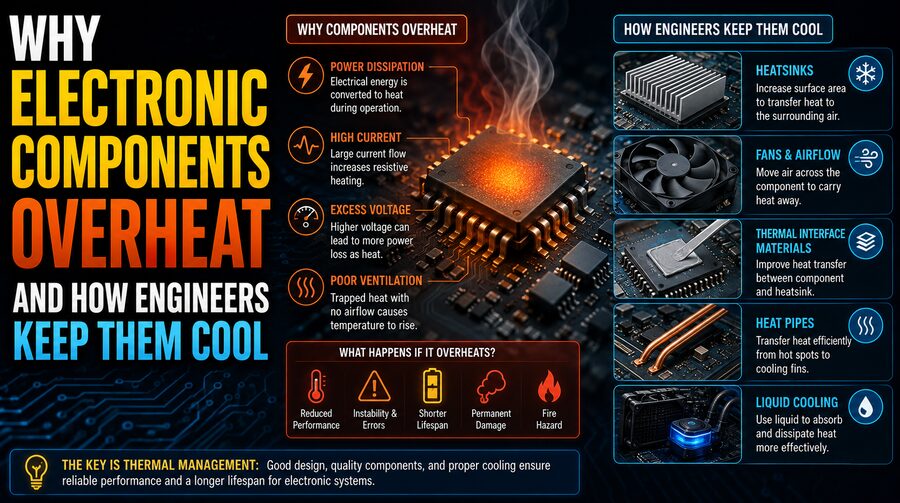

Electronic devices are everywhere—from smartphones and laptops to electric vehicles, industrial machines, satellites, data centers, and medical equipment. Although electronics seem clean and silent compared with mechanical engines, they still generate a surprising amount of heat.
That heat can become a serious problem.
When electronic components operate, electrical energy flows through transistors, wires, resistors, processors, power converters, and many other parts. Not all of that energy is converted into useful work. Some of it becomes heat. If the heat is not removed quickly enough, component temperatures rise.
Excessive temperature can reduce performance, shorten component life, cause temporary shutdowns, and in severe cases lead to permanent failure. 🔥
For this reason, thermal management is a major part of electronic engineering. Engineers use a combination of heat sinks, fans, thermal interface materials, liquid cooling, airflow design, temperature sensors, and intelligent software controls to keep devices within safe operating limits.
Understanding why electronics overheat begins with a simple principle: electrical power that is lost inside a component usually becomes heat.
⚡ Why Do Electronic Components Produce Heat?
Whenever electric current moves through a material that has resistance, some electrical energy is converted into thermal energy.
One basic relationship is:
P = I²R
where:
- P is power converted into heat
- I is electric current
- R is electrical resistance
This is known as Joule heating.
If current increases, heat generation can increase rapidly because current is squared in the equation.
This is why high-current components such as power transistors, voltage regulators, batteries, motor controllers, and charging circuits often require careful thermal design.
Electronic components can also generate heat through switching losses, leakage currents, dielectric losses, and other mechanisms.
🧠 Why CPUs and GPUs Get Hot
Modern processors contain billions of microscopic transistors.
These transistors switch between electrical states incredibly quickly—often billions of times per second.
Every switching event uses a small amount of energy.
One transistor produces almost no noticeable heat by itself. But when billions of transistors switch repeatedly, the total energy consumption can become significant.
A high-performance CPU or GPU may consume tens or even hundreds of watts.
Much of that electrical power eventually becomes heat.
This is why gaming computers, servers, artificial-intelligence accelerators, and high-performance workstations require powerful cooling systems. 💻🔥
🔄 Dynamic Power Consumption
A large portion of processor power consumption comes from charging and discharging tiny electrical capacitances inside integrated circuits.
A simplified relationship for dynamic power is:
P ≈ C × V² × f
where:
- C is effective capacitance
- V is supply voltage
- f is switching frequency
This equation reveals something important.
Increasing clock frequency increases power consumption, but increasing voltage can be even more significant because voltage is squared.
That is one reason overclocking processors often creates much more heat.
To achieve higher speeds, users may increase both frequency and voltage, dramatically increasing the cooling requirement.
🌡️ Leakage Current Also Creates Heat
Even when transistors are not actively switching, tiny amounts of current can still leak through them.
This is called leakage current.
As transistors have become smaller, controlling leakage has become increasingly important.
Leakage tends to increase as temperature rises.
That can create a dangerous feedback effect:
- A chip becomes hotter.
- Leakage current increases.
- Increased leakage generates more heat.
- The chip becomes even hotter.
Engineers must design processors and cooling systems to prevent this type of thermal instability.
🔌 Power Electronics Can Generate Intense Heat
Processors are not the only components that run hot.
Power electronics control large amounts of electrical energy.
Examples include:
- 🔋 Battery chargers
- 🚗 Electric vehicle inverters
- ☀️ Solar power converters
- ⚡ Power supplies
- 🏭 Industrial motor drives
- 🔌 Voltage regulators
Power transistors such as MOSFETs and IGBTs may switch large currents rapidly.
Even if they are highly efficient, a small percentage of lost energy can still become substantial heat.
For example, imagine a power converter handling 10,000 watts at 98% efficiency.
Two percent is lost.
That means approximately:
200 watts
may be converted into heat.
That heat must go somewhere.
🌡️ Why High Temperature Is Dangerous
Electronic components are designed to operate within specified temperature ranges.
If temperatures rise too high, several problems can occur.
⚠️ Performance Reduction
Many processors automatically reduce their speed when temperatures become excessive.
This process is called thermal throttling.
The processor lowers clock frequency, voltage, or both to reduce heat generation.
Users may notice slower performance during demanding tasks.
🧓 Accelerated Aging
Higher temperature can accelerate chemical and physical processes inside electronic materials.
Insulation can degrade.
Semiconductor junctions can age faster.
Capacitors can lose performance.
Solder connections can weaken over time.
As a general engineering principle, prolonged operation at higher temperatures often reduces component lifespan.
🔩 Thermal Expansion and Mechanical Stress
Materials expand when heated and contract when cooled.
Electronic assemblies contain many different materials, including:
- Silicon
- Copper
- Aluminum
- Solder
- Ceramic
- Fiberglass
- Plastic
These materials expand at different rates.
Repeated heating and cooling can create mechanical stress.
This phenomenon is called thermal cycling.
Over thousands of temperature cycles, solder joints and electrical connections may develop cracks.
Thermal cycling is especially important in automotive, aerospace, industrial, and high-power electronics.
💥 What Is Thermal Runaway?
Some electronic devices can experience thermal runaway.
Thermal runaway occurs when increasing temperature causes a component to generate even more heat.
The process can become self-reinforcing.
A simplified cycle is:
Higher temperature → increased current → more heat → even higher temperature
If not controlled, this can damage components.
Thermal runaway is an important concern in:
- Power transistors
- Batteries
- Semiconductor devices
- High-power circuits
Engineers use current limiting, temperature monitoring, cooling systems, and protective shutdowns to reduce the risk.
🌬️ Cooling Starts With Heat Transfer
To cool electronics effectively, engineers rely on three basic methods of heat transfer:
- Conduction
- Convection
- Radiation
Most electronic cooling systems use a combination of all three.
🧱 Conduction: Moving Heat Through Materials
Conduction transfers heat through direct contact.
Inside a processor, heat first moves from the semiconductor die through packaging materials.
It may then travel into a metal heat spreader and eventually into a heat sink.
Materials with high thermal conductivity transfer heat effectively.
Common thermal-management materials include:
- Copper
- Aluminum
- Graphite
- Specialized ceramics
Copper has excellent thermal conductivity, while aluminum is lighter and usually less expensive.
That is why many heat sinks use aluminum fins with copper bases or heat pipes.
🧊 What Is a Heat Sink?
A heat sink is a metal structure designed to absorb heat from an electronic component and transfer it to the surrounding environment.
Heat sinks often contain many thin fins.
The fins greatly increase surface area.
A larger surface area allows more heat to transfer from the metal into surrounding air.
Heat sinks are commonly used on:
- CPUs
- GPUs
- Power amplifiers
- Voltage regulators
- LED lighting systems
- Motor controllers
A heat sink does not create cold.
It simply helps heat move away from the electronic component more efficiently.
🌬️ Convection: Using Air to Remove Heat
Once heat reaches the surface of a heat sink, it must be transferred elsewhere.
Airflow can carry this heat away through convection.
Natural convection occurs when warm air rises and cooler air moves in to replace it.
For low-power devices, natural airflow may be enough.
Higher-power electronics often use fans.
Fans create forced convection, moving much more air across hot surfaces.
This greatly increases cooling capacity.
🌀 Why Fan Placement Matters
Simply adding a powerful fan does not guarantee good cooling.
Air must flow through the correct locations.
Engineers carefully design airflow paths so cool air reaches important components and hot air leaves the enclosure efficiently.
Poor enclosure design can create hot spots, where heated air becomes trapped.
Computer cases commonly use a combination of:
- Front intake fans
- Rear exhaust fans
- Top exhaust vents
- CPU cooler fans
- GPU cooling fans
Good airflow usually involves maintaining a clear path from cool-air intake to hot-air exhaust.
🧴 Thermal Paste and Thermal Interface Materials
A processor and a heat sink may look perfectly flat, but at a microscopic level their surfaces contain tiny imperfections.
If the two surfaces are placed together directly, small air gaps can form.
Air is a relatively poor conductor of heat.
Engineers therefore use thermal interface materials, or TIMs.
One familiar example is thermal paste.
Thermal paste fills microscopic gaps between surfaces and improves heat transfer.
Other thermal interface materials include:
- Thermal pads
- Phase-change materials
- Thermal adhesives
- Liquid-metal compounds
Different applications require different materials depending on temperature, pressure, electrical properties, and maintenance requirements.
🌡️ Heat Spreaders
Processors often include a metal plate called an integrated heat spreader.
Its purpose is to distribute heat from the relatively small processor die across a larger surface.
This larger surface can then transfer heat more effectively into the cooler.
Heat spreading is especially important when heat generation is concentrated in small regions called hot spots.
🔥 Heat Pipes
Many laptop and desktop cooling systems use heat pipes.
A heat pipe is a sealed tube containing a small amount of working fluid.
When one end becomes hot, the fluid evaporates.
The vapor travels toward a cooler region, where it condenses.
The condensed liquid then returns toward the hot area through capillary action or gravity.
This evaporation-condensation cycle can transfer heat very efficiently.
Heat pipes are widely used because they can move heat away from compact electronic components without requiring pumps.
🧊 Vapor Chambers
A vapor chamber operates on a principle similar to a heat pipe but spreads heat across a wider area.
Instead of a narrow tube, a vapor chamber typically uses a flat sealed structure.
Working fluid evaporates near hot regions and condenses in cooler areas.
Vapor chambers are commonly used in:
- High-performance GPUs
- Gaming laptops
- Smartphones
- Servers
- Compact electronics
They are particularly effective at reducing localized hot spots.
💧 Liquid Cooling
Air cooling eventually reaches practical limits when heat density becomes very high.
For powerful computers and industrial systems, engineers may use liquid cooling.
A typical liquid-cooling system includes:
- A cold plate or water block
- A pump
- Tubing
- Coolant
- A radiator
- Fans
Heat moves from the processor into the liquid.
The pump carries the heated coolant to the radiator.
The radiator transfers heat into the surrounding air.
The cooled liquid then returns to the processor.
Because liquids generally transport heat more effectively than air, liquid cooling can handle higher heat loads.
🏢 Liquid Cooling in Data Centers
Large data centers contain thousands of powerful servers.
Cooling these machines can require enormous amounts of energy.
Traditional facilities often cool the room air using industrial air-conditioning systems.
However, high-density computing—especially AI hardware—has increased interest in direct liquid cooling.
One approach places liquid-cooled cold plates directly on CPUs and GPUs.
Another technique is immersion cooling.
🌊 What Is Immersion Cooling?
In immersion cooling, electronic hardware is placed in a special electrically non-conductive liquid.
The liquid absorbs heat directly from the components.
Because the fluid does not conduct electricity under intended operating conditions, it can contact electronic equipment without causing ordinary short circuits.
Some immersion systems circulate liquid through heat exchangers.
Others use fluids that boil at relatively low temperatures, allowing heat to be removed through phase change.
Immersion cooling can be extremely effective for high-density computing. 🖥️💧
📱 Cooling Smartphones
Smartphones cannot use large fans or bulky heat sinks.
Engineers therefore rely heavily on passive cooling.
A smartphone may use:
- Graphite sheets
- Copper layers
- Vapor chambers
- Metal frames
- Thermal interface materials
- Software power management
The goal is to spread heat across a larger portion of the device.
The phone’s operating system also monitors temperature.
If the device becomes too hot, it may reduce processor speed, dim the screen, slow charging, or temporarily disable certain features.
🚗 Thermal Management in Electric Vehicles
Electric vehicles contain powerful electronic systems that produce significant heat.
Important heat-generating components include:
- 🔋 Battery packs
- ⚡ Inverters
- 🔌 Onboard chargers
- 🚗 Electric motors
- 🧠 Computing systems
EVs commonly use liquid cooling loops.
Maintaining battery temperature is particularly important because lithium-ion cells perform best within a controlled temperature range.
If they become too cold, performance may fall.
If they become too hot, battery aging accelerates and safety risks can increase.
Modern EV thermal systems may actively heat or cool battery packs depending on conditions.
🌞 Passive Cooling
Not every electronic device needs a fan.
Passive cooling removes heat without powered moving components.
Techniques include:
- Natural convection
- Large heat sinks
- Heat pipes
- Vapor chambers
- Thermally conductive chassis
- Radiation
Passive cooling has major advantages.
It produces no fan noise, consumes no electrical power, and has fewer mechanical parts that can fail.
This makes it ideal for routers, embedded systems, industrial controllers, and low-power computers.
🌌 Radiative Cooling
All objects above absolute zero emit electromagnetic radiation.
Hot electronic surfaces therefore release some energy through thermal radiation.
Radiation usually contributes less than conduction and convection in many everyday electronic systems, but it can become very important in certain environments.
Spacecraft provide an excellent example.
Because space is a vacuum, there is essentially no surrounding air for convection.
Spacecraft therefore rely heavily on conductive heat paths and radiators that emit thermal energy into space.
📡 Temperature Sensors Protect Electronics
Modern electronics often contain built-in temperature sensors.
A processor may contain several sensors positioned near different regions of the chip.
Control software continuously monitors these measurements.
If temperature begins approaching a safe limit, the system may:
- Increase fan speed.
- Reduce processor frequency.
- Lower voltage.
- Limit power consumption.
- Reduce charging speed.
- Shut down the system if necessary.
These protective mechanisms can respond automatically before permanent damage occurs.
⚙️ Dynamic Voltage and Frequency Scaling
One important thermal-management technique is Dynamic Voltage and Frequency Scaling, or DVFS.
A processor does not always need to operate at maximum speed.
During light workloads, the system can reduce frequency and voltage.
This saves energy and reduces heat.
When additional performance is required, the processor can temporarily increase its clock speed.
Modern laptops and smartphones use this strategy constantly.
It allows devices to balance:
- Performance
- Battery life
- Temperature
- Power consumption
🔥 Thermal Throttling
If a processor reaches a high temperature, it can automatically reduce performance.
This is called thermal throttling.
For example, a CPU operating at 4.5 GHz might temporarily reduce its frequency when cooling becomes inadequate.
The user may notice lower frame rates or slower processing.
Although throttling may seem undesirable, it is an important protection mechanism.
A slower processor is much better than a damaged processor.
🧮 Engineers Simulate Heat Before Building Products
Thermal engineering begins long before a finished product is manufactured.
Engineers use computer simulations to predict how heat will move through a device.
One common technique is Computational Fluid Dynamics, or CFD.
CFD software can model:
- Airflow
- Temperature distribution
- Pressure
- Fan performance
- Heat transfer
Engineers can identify hot spots and redesign airflow before creating physical prototypes.
Thermal cameras and temperature sensors are then used during testing to verify the simulation results.
📐 Thermal Resistance
Engineers often describe cooling performance using thermal resistance.
Thermal resistance indicates how much temperature increases for a given amount of heat flow.
It is often expressed in:
°C/W
A lower thermal resistance means heat can escape more effectively.
For example, if a cooling path has a thermal resistance of 0.5 °C/W and the component generates 100 watts, the temperature rise associated with that simplified path could be approximately:
50°C
This concept helps engineers compare heat sinks, thermal interfaces, packaging methods, and cooling systems.
🔍 Why Dust Causes Overheating
Dust may appear harmless, but it can seriously reduce cooling effectiveness.
Dust can:
- Block air vents
- Accumulate between heat-sink fins
- Reduce airflow
- Coat fan blades
- Trap heat
As airflow falls, temperatures rise.
This is why older computers sometimes become hotter and louder.
Their cooling fans must spin faster to compensate for restricted airflow.
Regularly cleaning ventilation paths can help maintain cooling performance.
🌀 Why Fans Become Loud Under Heavy Workloads
When a computer is idle, its processor consumes relatively little power.
During gaming, video rendering, scientific calculations, or AI processing, power consumption rises.
More power produces more heat.
Temperature sensors detect this increase.
The fan controller then increases fan speed.
Higher fan speeds move more air, but they also create more noise.
So the sudden loud fan noise during demanding software is often the cooling system responding exactly as designed. 🎮🌬️
⚠️ Common Causes of Electronic Overheating
Overheating can result from many factors, including:
- Blocked ventilation
- Failed fans
- Dried or poorly applied thermal paste
- Excessive power consumption
- High ambient temperature
- Poor enclosure airflow
- Dust accumulation
- Improper heat-sink installation
- Overclocking
- Component failure
In some systems, simply operating the device in a hot environment can significantly reduce cooling effectiveness because the temperature difference between the component and surrounding air becomes smaller.
🧪 Advanced Cooling Technologies
Researchers continue to develop new ways to cool increasingly powerful electronics.
Emerging techniques include:
- Microchannel liquid cooling
- Two-phase cooling
- Advanced thermal interface materials
- Embedded cooling channels
- Diamond-based heat spreaders
- High-performance ceramic materials
- Thermoelectric cooling
Microchannel systems are particularly interesting because tiny cooling channels can be placed very close to heat-producing semiconductor regions.
This can remove heat before it spreads through the rest of the package.
❄️ Thermoelectric Cooling
Thermoelectric coolers use the Peltier effect.
When electric current flows through certain semiconductor junctions, heat can be transferred from one side of the device to the other.
This creates a cold side and a hot side.
Peltier coolers can provide precise temperature control, but they consume electrical energy and still require a heat sink to remove heat from the hot side.
For this reason, they are used mainly in specialized applications rather than ordinary computer cooling.
🌍 Why Efficient Cooling Matters
Cooling is not just about protecting individual devices.
At large scale, it affects global energy consumption.
Data centers use enormous amounts of electricity, and a significant portion can be associated with cooling and supporting infrastructure.
Improving cooling efficiency can reduce:
- ⚡ Electricity consumption
- 💰 Operating costs
- 🌱 Environmental impact
- 🧰 Hardware failures
Better thermal management can also allow processors to operate faster without exceeding temperature limits.
In that sense, cooling technology directly influences computing performance.
🌟 Final Thoughts
Electronic components overheat because electrical energy is never converted into useful work with perfect efficiency. Resistance, transistor switching, leakage currents, and power-conversion losses all turn part of that energy into heat.
As electronics become smaller and more powerful, thermal management becomes increasingly challenging.
Engineers respond by creating carefully designed pathways that move heat from microscopic semiconductor junctions into larger surfaces and ultimately into the surrounding environment.
They use thermal paste to improve contact, heat spreaders to distribute temperature, heat sinks to increase surface area, fans to move air, heat pipes and vapor chambers to transport heat, and liquid cooling to handle very high power densities. 💻❄️
At the same time, sensors and software continuously monitor temperature. When necessary, devices can increase cooling, reduce voltage and frequency, limit performance, or shut down entirely.
The result is a carefully balanced system.
A modern processor may perform billions or trillions of operations while producing enough heat to damage itself if cooling fails. Yet with well-designed thermal engineering, that heat is continuously transported away.
From smartphones and laptops to electric vehicles, satellites, and enormous AI data centers, keeping electronics cool is essential for performance, reliability, safety, efficiency, and long-term durability.
As computing power continues to increase, cooling will remain one of the most important—and often invisible—technologies enabling the electronic world around us. 🔥➡️❄️⚙️