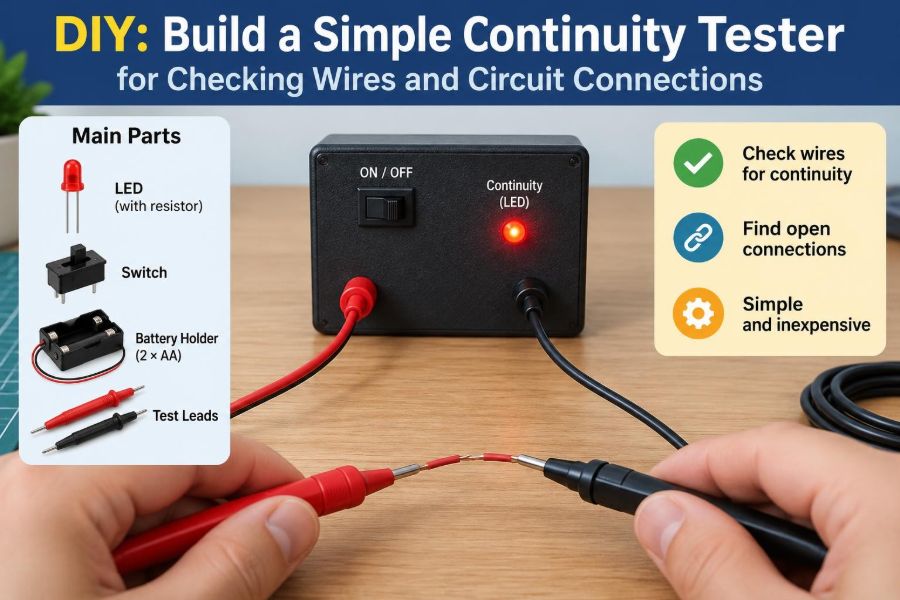

A lamp will not turn on. A charger cable works only when bent at a certain angle. A prototype on a breadboard looks correct, yet nothing happens when power is applied. In each case, a broken or unwanted connection may be the real problem.
A multimeter can check continuity quickly, but there are times when one is unavailable, tied up on another bench, or more complicated than the job requires. A simple battery-powered continuity tester is a useful tool for learning what an electrical connection actually means.
Building one also teaches several practical engineering habits: reading component polarity, limiting current, making dependable probe leads, and testing a circuit safely before trusting its indication.
This project is deliberately modest. It will not replace a properly rated multimeter, but it can reliably answer a very useful low-voltage question: does a safe, unpowered path exist between these two points?
🧭 What a continuity tester tells you
A continuity tester checks whether electricity can travel through a path between two probes. When the probes touch opposite ends of a conductive path, the tester completes its own small circuit and provides an indication, usually light, sound, or both.
It does not directly measure resistance with a calibrated numeric result. Instead, it makes a practical decision: the resistance is low enough for the tester’s current to flow and trigger its indicator.
For example, it can help identify whether a wire is intact, whether a switch closes, or which terminal on a connector is connected to a particular pin.
⚡ The basic electrical idea
The circuit is a series loop: battery, current-limiting resistor, LED, probes, and the item being tested. With the probes separated, the loop is open and no meaningful current flows. Touching them through a low-resistance path closes the loop.
Current is the movement of electric charge. In this tester, the battery provides the voltage that pushes current through the loop. The LED converts a small part of that electrical energy into visible light.
An analogy is a hose with a valve: battery voltage resembles pressure, current resembles water flow, and an open wire or switch resembles a closed valve.
🧪 What this project can and cannot test
A basic tester is well suited to low-voltage, unpowered items. It is especially helpful for troubleshooting simple wiring and for tracing connections during assembly.
- Checking a jumper wire, cable conductor, or soldered joint
- Testing a pushbutton, toggle switch, reed switch, or fuse
- Finding matching terminals on a connector
- Checking whether adjacent breadboard holes share an internal metal strip
- Locating obvious breaks in simple low-voltage wiring
It cannot tell you the exact resistance of a connection. It is also not a safe instrument for mains-powered equipment, high-voltage circuits, energized circuit boards, or installations where a low test current could cause damage or unintended operation.
🛑 Start with the essential safety boundary
Use this continuity tester only on circuits that are disconnected from all power sources. Remove batteries where practical, unplug external supplies, and allow stored charge to dissipate before probing.
An energized circuit can force current backward through the tester, damage the LED, create misleading results, or expose the user to hazardous voltage. A battery-powered DIY tool has no assured input protection, no safety category rating, and no designed overvoltage capability.
Do not use it on household wiring, wall outlets, distribution boards, vehicle high-voltage systems, or unknown equipment. For those applications, use an appropriate, correctly rated meter and follow relevant safety procedures.
🧰 Parts for the LED version
The simplest visual version needs only a few common components. A 9 V battery is convenient because its snap connector is widely available, although other battery arrangements can work when the resistor is recalculated.
- One 9 V battery and battery snap connector
- One LED, preferably red, green, or yellow
- One resistor, typically 1 kΩ to 2.2 kΩ for a 9 V supply
- Two insulated wires for probe leads
- Two probe tips, clips, or stiff pieces of insulated wire
- Heat-shrink tubing or electrical tape for insulation
- A small enclosure, stripboard, or solderless breadboard
A red LED is a forgiving choice because it usually lights visibly at modest current. Select components in good condition and inspect their leads before construction.
💡 Why the resistor is not optional
An LED is not a lamp that can simply be connected across a battery. Once forward-biased, its voltage changes only modestly while current can rise rapidly. Without a series resistor, the LED may draw excessive current and fail.
The resistor creates a predictable limit. Using a 9 V battery, a red LED with an approximate forward voltage near 2 V, and a 1 kΩ resistor gives an estimated current of about 7 mA using the relationship I = (Vsource − VLED) / R.
Actual brightness and current vary with the battery, LED type, temperature, and component tolerance. The point is not perfect precision; it is ensuring a conservative, safe current for the indicator.
📐 Choosing a sensible resistor value
A resistor between 1 kΩ and 2.2 kΩ is usually practical with a fresh 9 V battery and a standard indicator LED. The lower end produces a brighter light and somewhat greater test current. The higher end extends battery life and is gentler on delicate paths, but may be dimmer.
| Resistor value | Typical effect with a 9 V battery | Useful situation |
|---|---|---|
| 1 kΩ | Bright LED, several milliamps of test current | General bench use in normal room lighting |
| 1.5 kΩ | Moderate brightness and current | A balanced everyday choice |
| 2.2 kΩ | Lower brightness and current | Close-up work and more conservative testing |
If you use a blue or white LED, its forward voltage is commonly higher than that of a red LED. It may appear dimmer with the same resistor, especially as the 9 V battery discharges.
🔍 Identify LED polarity before soldering
An LED conducts mainly in one direction. The anode is the positive side, and the cathode is the negative side. Reversing the LED normally prevents it from lighting.
On a new through-hole LED, the longer lead is usually the anode. The flat edge on the plastic body marks the cathode. Check both markings if the leads have been trimmed, because lead length alone may no longer be useful.
In the finished circuit, connect battery positive through the resistor to the LED anode. The cathode then continues to one probe lead.
🗺️ Read the circuit before building it
The circuit has no hidden complexity. Follow it from the battery’s positive terminal: positive lead, resistor, LED anode, LED cathode, first probe, item under test, second probe, then battery negative.
Battery + → resistor → LED anode → LED cathode → Probe A
Probe B → Battery −

Probe A and Probe B are connected by the item under test.
The resistor and LED can trade places in the series path without changing the basic function, provided the LED polarity remains correct. Keeping the resistor near the positive battery lead often makes the layout easier to inspect.
🛠️ Build the circuit first on a breadboard
A solderless breadboard is a low-risk place to confirm the circuit. Insert the LED so that its two leads are not in the same connected row. Place the resistor from the battery-positive rail to the LED anode row.
Connect a wire from the LED cathode to Probe A. Connect Probe B directly to the battery-negative rail. Keep probe wires in separate rows until the final test.
Before installing the battery, trace every connection with your finger or on paper. This simple pause catches many errors, including a resistor placed across the wrong breadboard gap.
✅ Perform the first self-test
After connecting the battery, touch the two probe tips together briefly. The LED should illuminate. This is the tester’s known-good reference condition.
If it lights, separate the probes. The LED should turn off. A faint glow with separated probes can indicate leakage, contamination, an incorrect breadboard connection, or a circuit path that was not intended.
Test the tool again whenever you change its wiring. A continuity indication is only useful when you know the tester itself is functioning properly.
🔊 Add a buzzer for hands-free feedback
A light is quiet and clear, but a buzzer lets you keep your eyes on the work. Use an active buzzer rated for the battery voltage; it contains its own oscillator and sounds when DC power is applied.
An LED and active buzzer can be connected in parallel after a suitable current-limiting arrangement, but the exact design depends on the buzzer’s voltage and current requirements. A simpler approach is to build the LED version first, then consult the buzzer datasheet before adding one.
A passive piezo element is different: it generally requires an alternating signal, so it will not reliably make a sustained tone from this basic DC circuit.
🔋 Understand the battery’s role
A 9 V battery is portable, but its capacity and ability to supply current are limited compared with larger cells. The tester draws current only while a path is being tested, so ordinary use can last a reasonable time, but leaving the probes shorted will drain the battery.
As the battery voltage falls, the LED becomes dimmer and the tester may stop responding to paths it previously detected. That does not necessarily mean the wire has failed.
If results seem uncertain, first touch the probes together. A weak or absent reference indication means the battery or tester needs attention before the item under test can be judged.
🧵 Make probe leads that survive bench work
Many homemade testers fail mechanically before they fail electrically. Repeated bending at a solder joint can break fine wire strands inside the insulation, creating an intermittent fault that is frustrating to diagnose.
Use flexible stranded wire for the leads and add strain relief where each lead exits the enclosure. Heat-shrink tubing over the wire and joint can reduce sharp bending; a knot, cable tie, or clamp inside the case can carry pulling force away from the soldered connection.
For probe ends, insulated crocodile clips are useful for holding a wire or terminal. Pointed probes are better for breadboards and connectors, but leave only a short metal tip exposed to reduce accidental shorts.
📦 Move from prototype to a durable enclosure
A breadboard version is excellent for learning, but it is easy to pull apart and its exposed metal can touch objects on a crowded bench. A small plastic enclosure makes the tester more dependable and safer to handle.
Mount the LED where it can be seen, route probe leads through protected holes, and secure the battery so it cannot pull on wiring. Keep bare solder joints covered with heat-shrink tubing or insulating barriers.
Label the probes if their polarity matters for a later upgraded version. For this simple LED tester, either probe can contact either end of an ordinary wire, but clear labeling supports good habits.
🧷 Test ordinary wires correctly
To test a loose wire, touch one probe to each stripped end. A bright, steady LED generally indicates an intact conductor with low enough resistance for the tester.
If a cable has molded ends or connectors, identify the corresponding contacts first. On a multi-core cable, test one conductor at a time, then check between neighboring conductors to look for an unwanted short.
Keep fingers away from exposed metal at the probe tips. Your skin can provide a resistive path, especially when damp, and may create confusing weak indications in sensitive circuits.
🎚️ Check switches, buttons, and fuses
A switch should produce a clear change: LED off in its open state and LED on in its closed state. A pushbutton may light the LED only while pressed; this is expected for a normally open button.
For a fuse removed from an unpowered circuit, a good conventional fuse usually shows continuity. A blown fuse usually does not. However, continuity alone does not identify why a fuse opened, and replacing it without finding the underlying fault can cause repeated failure.
Some switches have multiple poles or changeover contacts. Use the terminal markings or a component diagram so you test the contacts that are supposed to connect in each position.
🧩 Trace breadboard connections
Breadboards contain hidden spring contacts. Their layout varies, particularly around power rails and the center channel, so assumptions can lead to wiring mistakes.
Use the tester to map an unfamiliar board before building on it. Probe pairs of holes you expect to share a strip, then verify that holes across a center gap or rail break do not show continuity.
This is also a useful diagnostic for an old breadboard. If a connection is intermittent when a component lead is moved, the internal contact may be worn or contaminated.
🔌 Explore connectors without guessing
Connectors can look symmetrical while having different internal pin assignments. With equipment fully disconnected, continuity testing can reveal which pin at one end corresponds to a pin at the other end.
Work systematically: choose one pin, hold one probe there, and touch the other probe to candidate pins. Record the result before moving on. For a multi-pin connector, a small hand-drawn pin map prevents repeated work.
Do not assume every connector pin is a simple straight-through conductor. Some cables contain electronics, shielding, resistors, or crossovers, so an unexpected result may be intentional.
🧠 Interpret brightness as a clue, not a measurement
A fully lit LED usually means the path resistance is relatively low compared with the tester’s series resistor. A dim LED can suggest higher resistance, a weak battery, surface oxidation, a poor probe contact, or an LED with a higher forward voltage.
Brightness is not a calibrated scale. Two LEDs can differ visibly at the same current, and ambient light changes what your eyes perceive. Do not use a dim result to claim a particular resistance value.
When a connection matters electrically, follow a suspicious indication with a multimeter resistance measurement or a voltage-drop test under an appropriate load.
🚧 Know why some good components appear open
A continuity tester applies one polarity and a limited voltage. Components such as diodes, LEDs, transistors, integrated circuits, and capacitors do not behave like plain wires, so their results can be misleading.
A diode may light the tester in one direction and not the other. A capacitor may create a brief flash as it charges, then appear open. An in-circuit semiconductor can show several paths through other components connected around it.
These observations can be educational, but they are not enough to declare an electronic component good or bad. Use a meter’s diode mode, capacitance function, or the relevant circuit analysis when needed.
🧯 Avoid testing sensitive or connected electronics
Even a modest test voltage can be inappropriate for some low-voltage electronics. Inputs with protection networks, logic pins, sensors, and circuits powered by another source may respond unpredictably or be stressed by an improvised tester.
Before testing a board, understand what else is connected to the two points. Remove power, disconnect external cables where possible, and consider whether the path includes semiconductors rather than just copper traces or mechanical contacts.
For electronics troubleshooting, a quality multimeter’s continuity mode is often the more suitable tool because its behavior is documented and its test conditions are designed for measurement.
🧹 Clean contacts before condemning a wire
A dirty connector, oxidized battery terminal, or probe tip with residue can add enough resistance to make the LED dim or intermittent. Before assuming a wire is broken, press the probes firmly, rotate them slightly, and inspect the contact surface.
Clean disconnected metal contacts using a suitable method for the material and equipment. Avoid aggressive abrasion on plated connector pins, because removing their protective finish can make long-term corrosion worse.
Also inspect the tester’s own probe tips. A tool used repeatedly on solder flux, adhesive residue, or corroded terminals eventually needs maintenance.
🐛 Diagnose a tester that never lights
Start with the simplest condition: touch the probes together and use a known-fresh battery if available. If there is still no light, work backward through the circuit rather than changing several things at once.
- Check battery polarity and the battery snap connection.
- Check LED orientation; reverse it only after disconnecting the battery.
- Confirm the resistor is in series, not bypassed or disconnected.
- Inspect for broken wires, loose breadboard contacts, and cold solder joints.
- Test the LED and resistor separately with a multimeter if one is available.
A systematic check is faster than guessing because each observation eliminates a defined set of possible faults.
🌟 Diagnose a tester that stays lit
If the LED remains on while the probes are apart, there is an unintended path between them. On a breadboard, this commonly means both leads occupy electrically connected rows or rails.
In an enclosure, look for solder bridges, stray wire strands, crushed insulation, or conductive debris. Disconnect the battery before moving wires or scraping solder.
A persistent glow may also occur if the probes rest on a conductive surface. Place them apart on a clean insulating surface while checking the tool.
📏 Compare this tool with a multimeter
A homemade tester wins on simplicity, visibility, and learning value. It can be kept near a project as a quick dedicated checker, and its circuit is transparent enough to repair and modify.
A multimeter is more versatile. Its continuity function often includes an audible alert, while resistance mode gives a numerical value. Better meters may also provide diode testing, current measurement, voltage measurement, and known protection characteristics.
The practical conclusion is not that one replaces the other. A simple tester handles quick, safe checks; a multimeter is preferable when the result must be measured, documented, or interpreted with greater confidence.
🧱 Upgrade the design thoughtfully
Once the basic version works, upgrades should solve a real limitation rather than add complexity for its own sake. A switch can prevent accidental battery drain in storage. A buzzer can provide audible feedback. A larger resistor can reduce test current.
You might also add a protected probe holder, a battery-access door, or a second LED arrangement to demonstrate polarity. More advanced transistor or comparator-based testers can detect higher resistance and provide sharper thresholds, but they require careful design and validation.
Each added component creates new failure modes. Preserve the ability to self-test by touching the probes together after every modification.
🗒️ Build a repeatable test routine
Good troubleshooting depends as much on method as on tools. Before checking continuity, identify the expected path and make sure the circuit is unpowered. Then verify the tester on its own probes.
- Disconnect power and isolate the item where practical.
- Touch the probes together to confirm the tester operates.
- Probe the two points that should, or should not, connect.
- Repeat while gently flexing suspect cables or operating the switch.
- Record unexpected results and confirm them with another method when consequences matter.
Flex testing is particularly helpful for cables that fail only when moved. Treat the observation as evidence of an intermittent fault, then inspect the strain points rather than assuming the entire cable is defective.
🎓 Use the project to practice circuit thinking
This small build demonstrates a foundational idea: a circuit needs a complete path, a source, and controlled current. The LED provides immediate feedback, so cause and effect are easy to observe.
Try hypothetical variations on paper before rewiring. What happens if the LED is reversed? What happens if a switch is placed in series? Why does a larger resistor dim the LED? These questions turn a repair tool into a compact laboratory exercise.
The most valuable habit is tracing the complete loop. Whenever something does not work, ask where current is supposed to travel and where that path may be open, shorted, or restricted.
🏁 The core takeaway: verify the path safely
A continuity tester is not complicated because its job is focused. It uses a small internal source and an indicator to reveal whether the probes are joined by a sufficiently conductive path.
Its limits matter as much as its usefulness. Test only de-energized, low-voltage paths; include a current-limiting resistor; insulate the construction; and treat ambiguous results as a reason for further measurement rather than a final diagnosis.
When built carefully and checked against a known condition, this simple tool can make wire faults, switch behavior, connector mapping, and breadboard errors much easier to understand.
A well-built continuity tester teaches the same disciplined lesson used in larger engineering work: establish the expected path, test it safely, and let the evidence guide the next step. 🔌🛠️⚡