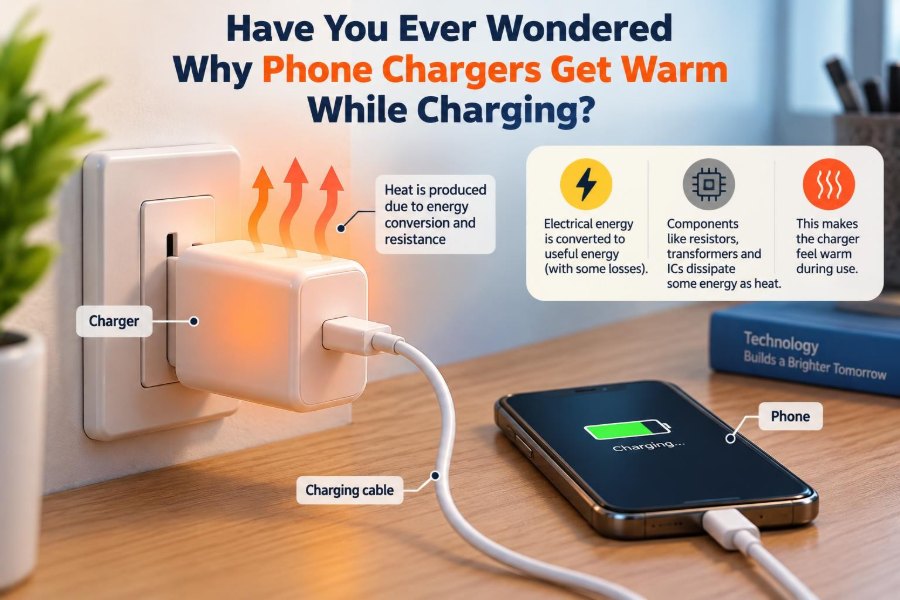

You plug in your phone after a long day, return a little later, and notice that the charging brick feels warm. Often it is only mildly warm—noticeable but not alarming. Still, it raises a sensible question: where is that heat coming from?
A charger is supposed to deliver electrical energy to a battery, not act like a miniature heater. Yet every real charger wastes some energy, and that wasted energy must go somewhere. Usually, it becomes heat.
The warmth is not automatically a sign of a bad charger. In fact, a small amount of heating is an expected consequence of converting household electricity into the carefully controlled low-voltage power that a phone can use.
Understanding the difference between normal warmth and warning-level heat helps you charge more safely, choose accessories wisely, and recognize when a cable, charger, outlet, or phone may need attention.
🔋 The Short Answer: Energy Conversion Makes Heat
Your wall outlet supplies alternating current, or AC, at a relatively high voltage. A phone battery needs low-voltage, tightly regulated direct current, or DC. The charger performs that conversion.
No practical power converter is perfectly efficient. Some input power reaches the phone, some becomes electromagnetic noise that must be managed, and some is lost as heat inside components. That heat travels through the charger case and becomes noticeable to your hand.
The central idea is simple: charger warmth is usually evidence of energy loss, not energy creation.
⚡ What a Modern Phone Charger Actually Does
A compact USB charger contains much more than wires connecting the mains supply to a USB port. Its circuitry rectifies AC into DC, switches it at high frequency, transfers energy through a small transformer, and regulates the output.
It must also respond to the device connected to it. With USB Power Delivery or similar protocols, the phone and charger communicate to choose an appropriate voltage and current combination. The charger then continuously monitors and adjusts its operation.
Each stage has losses. Individually they may be modest, but together they explain why a working charger does not remain perfectly cool.
🔄 Why Chargers Use Switching Power Supplies
Most current phone chargers are switch-mode power supplies. Instead of using a large, heavy mains-frequency transformer, they switch electrical current on and off very rapidly and use a small high-frequency transformer.
This design is far more compact and generally more efficient than older linear power supplies. It is why a charger capable of delivering substantial power can fit in a pocket.
Switching does not eliminate heat. Transistors lose energy while changing state, magnetic components have internal losses, and control circuits consume a little power. Better designs reduce these losses; they cannot reduce them to zero.
📉 Efficiency Explains the Temperature Rise
Efficiency compares useful output power with input power. If a charger supplies 18 watts to a phone but must draw somewhat more than 18 watts from the outlet, the difference is dissipated within the charger or its associated cable.
For example, if a hypothetical charger delivers 20 watts and loses 2 watts internally, those 2 watts become heat. Two watts may sound small, but concentrated in a palm-sized plastic enclosure with limited airflow, it can produce a clearly warm surface.
Higher-quality designs often improve efficiency, but external temperature also depends on enclosure size, room temperature, charging duration, and how well the charger can release heat.
🔥 Resistance Turns Current Into Heat
Electrical resistance is a basic source of heating. When current flows through a conductor with resistance, electrical energy is converted into thermal energy. This is often summarized by the relationship P = I²R, where power loss depends on current squared times resistance.
The squared term matters. Doubling current can increase resistive heating by roughly four times if resistance stays unchanged. That is one reason high-current charging places more demand on connectors, cable conductors, and internal charger paths.
Resistance exists everywhere: circuit-board traces, transistor paths, transformer windings, USB contacts, and cable wires. Good engineering keeps it low where large current flows.
🧩 The Components That Produce Most Heat
Heat is distributed across several parts of a charger rather than coming from one universal “hot component.” The exact pattern depends on charger design and operating power.
- Switching transistors lose energy during conduction and switching transitions.
- Transformer windings and magnetic cores have copper and magnetic losses.
- Rectifiers lose some voltage and power while directing current.
- Capacitors and control circuitry have smaller but real internal losses.
- USB connector contacts can heat if contact resistance is elevated.
Designers arrange these components, copper areas, insulation barriers, and the enclosure so heat can spread rather than concentrating at one damaging point.
🚀 Why Fast Charging Usually Feels Warmer
Fast charging transfers more energy in less time. More power means more current, more voltage, or both, depending on the charging protocol and stage of the process. More power generally leads to greater losses in the charger and cable.
That does not mean fast charging is inherently unsafe. A properly designed charger and phone negotiate operating limits and include temperature monitoring. But a 45-watt charger delivering a large portion of its rated power will usually run warmer than a low-power charger slowly topping up a phone overnight.
The phone itself may also become warm, especially while its battery accepts power rapidly. Charger heat and phone heat are related, but they have different physical locations and causes.
🔌 Power Rating Is Not Constant Power Draw
A charger marked “30 W” is capable of supplying up to a stated power under suitable conditions. It does not continuously force 30 watts into every connected phone.
The phone requests what it can accept, and that request changes during charging. A small device may draw only a few watts. A compatible phone with a low battery may briefly request much more. A laptop may use a greater share of the charger’s capability.
Consequently, a high-rated charger can be cool while charging a small accessory and warm while powering a demanding device. Its label alone cannot predict its temperature.
📈 Charging Is Not a Flat, Constant Process
Lithium-ion battery charging commonly has stages. When the battery is relatively low and conditions permit, the phone can accept energy quickly. As battery voltage rises and the battery approaches full charge, the charging system reduces current.
This is why a charger may feel warmest during the earlier, faster portion of a charging session, then cool down later. The exact behavior varies by device, battery temperature, software settings, and charging standard.
Battery-protection features may deliberately slow charging at certain times, such as when the phone predicts it will remain plugged in for many hours. Less charging power generally means less heat.
📱 The Phone Can Influence Charger Temperature
The charger is only one member of the charging system. The phone decides whether to accept high-power charging, conventional USB power, or a reduced rate. It may restrict power when its battery is cold, hot, very full, or aging.
Running navigation, gaming, video calls, hotspot service, or a demanding app while charging adds another complication. The phone is consuming power while receiving it, which can lengthen the period of elevated charging activity and make the entire setup warmer.
If a phone repeatedly slows charging because it is hot, the issue may be its environment or workload rather than a defective wall adapter.
🧵 Cables Are Electrical Components, Not Accessories
A USB cable carries current, communicates capability in some configurations, and experiences bending, wear, contamination, and strain. It is not merely a passive convenience item.
A cable with thin conductors or excessive resistance drops voltage as current passes through it. The lost energy becomes heat along the cable and at its connectors. In severe cases, a poor connection can become noticeably hotter than the charger itself.
For higher-power USB-C charging, use a cable designed for the power level you expect to draw. A physically compatible connector does not guarantee that the cable is suitable for every charging mode.
🧲 Connector Resistance Can Create Local Hot Spots
The metal contacts in a USB plug and port must press together reliably. Dirt, corrosion, moisture residue, wear, or a loose-fitting plug can increase contact resistance.
Unlike normal internal warmth spread across a charger case, poor contact often produces a localized hot spot near the plug, USB port, or cable end. The connection may also disconnect intermittently or charge unusually slowly.
Do not scrape aggressively inside a phone port or charger socket. If debris is suspected, disconnect power first and use a safe cleaning method appropriate to the device manufacturer’s guidance.
🌡️ Ambient Temperature Changes What “Warm” Means
Chargers release heat to the surrounding air by conduction, convection, and radiation. When the room is warm, there is less temperature difference between the charger and its surroundings, so heat escapes more slowly.
A charger that feels only mildly warm on a cool desk may feel much hotter in a sunlit car, a poorly ventilated room, or a bag. Surface temperature is affected by conditions, not just electrical performance.
Temperature limits in products are designed with operating conditions in mind, but avoiding unnecessary heat remains sensible. Keep chargers out of direct sunlight and away from heat sources when possible.
🛏️ Soft Surfaces Trap Heat
A charger placed on a hard tabletop has access to surrounding air. One wedged under bedding, a pillow, clothing, or a sofa cushion cannot shed heat as effectively.
Soft materials can insulate the charger and may cover its surfaces completely. They can also trap the warmth from the phone and cable in the same small area. This is a poor environment for any power conversion device.
Charge on an open, stable, nonflammable surface whenever practical. The goal is not to make a charger cold; it is to give normal heat a clear path out.
📦 Small Chargers Have Less Area to Shed Heat
Modern gallium nitride, or GaN, chargers can be smaller than conventional silicon-based chargers with similar ratings. GaN power devices can switch efficiently at high frequencies, allowing smaller magnetic components and compact layouts.
Compact size is useful, but it reduces external surface area for releasing heat. A small charger may therefore feel warmer than a larger model even when both are functioning safely and efficiently.
Warmth alone is not a reliable quality test. A charger’s thermal design, material choices, control behavior, and operating load matter more than whether it feels warmer than a bulkier predecessor.
🧊 Why Charger Cases Feel Different at the Same Temperature
Your hand judges heat partly by how quickly heat flows into your skin. Metal often feels hotter or colder than plastic at the same actual temperature because it conducts heat more readily.
Surface texture, color, wall thickness, and the location of internal components also affect perception. A warm spot near the USB port may be more noticeable than heat distributed across a broad case.
For this reason, touch is useful for recognizing dramatic changes, but it is not a precision measurement. A thermometer can provide more objective information, although interpreting a safe operating limit still requires manufacturer-specific context.
✅ Normal Warmth Versus Concerning Heat
Mild to moderate warmth during active charging is commonly expected, particularly with fast charging. A charger that returns toward room temperature after the load is removed is also behaving in a generally understandable way.
Concern increases when heat is extreme, persistent, localized at a connector, or paired with abnormal behavior. There is no universal hand-feel threshold because skin sensitivity and charger designs differ, so focus on the overall pattern rather than trying to assign an exact temperature by touch.
| Observation | Likely interpretation | Practical response |
|---|---|---|
| Slight warmth during charging | Typical conversion losses | Ensure open airflow and continue observing |
| Warmer during fast charging | Higher power transfer | Use a suitable cable and avoid insulating surfaces |
| Hot plug or port | Possible contact resistance or damage | Disconnect and inspect the cable and port |
| Burning smell, discoloration, swelling, or sparking | Possible fault | Stop using the equipment and replace or seek service |
🚨 Warning Signs That Merit Immediate Attention
Disconnect the charger from power if you notice a burning odor, smoke, crackling, visible melting, discoloration, repeated sparks, or a case that appears distorted. Do not keep testing a suspect charger to see whether the symptom returns.
A charger that becomes uncomfortably hot while delivering little power, repeatedly stops and starts, or makes unusual noises also deserves caution. These signs do not identify one definite fault, but they justify removing the device from service.
If the phone battery is swollen, the phone itself is damaged, or liquid exposure is suspected, stop charging it. Battery damage requires more care than replacing a cable or adapter.
🛡️ Built-In Protections Help, but They Are Not Permission to Ignore Problems
Reputable charging equipment commonly includes protections against overcurrent, overvoltage, overheating, and short circuits. A charger may reduce output or shut down when it detects an abnormal condition.
These features are valuable, but no protection system makes poor handling harmless. A damaged cable, obstructed ventilation, contaminated connector, or counterfeit accessory can introduce conditions outside normal use.
Treat safety features as a backup layer. Good accessory selection, inspection, and placement remain the first layer of defense.
🏷️ Why Quality and Compatibility Matter
Chargers that follow relevant electrical safety requirements and use components suited to their ratings are more likely to regulate output and manage heat predictably. Branding alone does not prove quality, but extremely dubious construction and unclear specifications are reasonable reasons for caution.
Compatibility matters too. USB-C describes a connector shape and a family of specifications, not one fixed charging capability. A charger, cable, and device must agree on a charging mode before higher-power operation can occur.
Choose accessories from sources that provide clear electrical ratings, realistic documentation, and a straightforward return or support path. Avoid assuming that every USB-C cable supports the same current or data capability.
🔍 A Simple Troubleshooting Sequence
If a charger seems hotter than usual, change one variable at a time. This approach helps isolate whether the cause is the charger, cable, phone, outlet area, or charging environment.
- Disconnect the system and allow it to cool on an open surface.
- Inspect the charger, cable, and connectors for damage, debris, looseness, or discoloration.
- Try a known-good cable with the same charger, if available.
- Try the original or another trusted charger with the phone.
- Remove thick cases and close demanding apps before retesting.
- Observe whether the warmth is in the brick, cable, plug, phone port, or battery area.
Stop rather than troubleshoot further if there are clear fault signs such as odor, melting, or arcing. Electrical damage is not a do-it-yourself experiment.
🚫 Common Charging Mistakes That Raise Temperature
Many heat issues arise from ordinary habits rather than failed electronics. The following practices place unnecessary thermal stress on the charging setup:
- Charging under blankets, pillows, clothing, or inside a crowded bag.
- Using frayed, loose, or visibly damaged cables.
- Forcing a plug into a contaminated or damaged port.
- Charging while the phone performs demanding tasks for long periods.
- Leaving a charger in a hot vehicle or direct sun.
- Using unverified adapters, splitters, or extension accessories of uncertain condition.
None of these guarantees a failure. They simply reduce the system’s ability to manage heat and make abnormal conditions harder to notice.
🔌 Power Strips and Wall Outlets Can Be Part of the Story
The warmth may not originate entirely in the charger. A worn outlet, overloaded power strip, loose extension lead, or poor plug contact can create resistance upstream of the charging brick.
If the wall plug or outlet faceplate feels hot, if plugs fit loosely, or if you observe discoloration, stop using that outlet or strip and have it assessed appropriately. Do not assume the USB charger is the only component worth inspecting.
For ordinary phone charging, a sound wall outlet is generally straightforward. Problems arise when damaged or overloaded distribution equipment is added to the chain.
🔋 Wireless Charging Moves Some Heat Into the Phone
Wireless charging uses magnetic fields to transfer energy from a charging pad to a receiver coil in the phone. This convenience comes with additional conversion stages and alignment sensitivity.
If the phone is not well aligned, if the case is thick or unsuitable, or if foreign material sits between the phone and pad, efficiency can decrease. More energy is then lost as heat in the pad, phone, or both.
A warm wireless charging pad is therefore not surprising. However, repeated excessive phone heating, especially with charging interruptions, is a reason to check alignment, case compatibility, and the condition of the charger.
🧪 Measuring Heat Requires Context
An infrared thermometer or thermal camera can reveal whether heat is distributed or concentrated at a connector. These tools are useful for diagnosis, but readings can be affected by surface finish and measurement method.
Electrical measurements add more context. A USB power meter can show negotiated voltage, current, and power, helping explain why one session is warmer than another. It cannot by itself certify that equipment is safe.
For engineers, meaningful evaluation combines surface temperature, ambient temperature, load, duration, enclosure design, and component limits. A single temperature number without those conditions can mislead.
🧠 Thermal Design Is an Engineering Trade-Off
Charger designers balance efficiency, cost, size, safety spacing, electromagnetic interference control, reliability, and user comfort. Improving one factor can complicate another. A smaller enclosure is convenient, but dense layouts require careful thermal paths.
Materials, internal potting compounds, copper area on circuit boards, transformer design, and control algorithms all influence heat. Some designs intentionally reduce power when conditions become hot, trading charging speed for component protection.
This is why two chargers with identical advertised output ratings can behave differently in the hand. Their peak rating tells only part of the engineering story.
🧭 Practical Habits for Cooler, Safer Charging
You do not need to avoid fast charging or constantly monitor a charger. A few routine choices address most avoidable heating problems.
- Use a trustworthy charger and a cable rated for the intended device and power level.
- Place the charger and phone in open air on a firm surface.
- Keep connectors clean, dry, and free from strain.
- Replace cables with damaged insulation, loose plugs, or erratic charging behavior.
- Reduce demanding phone activity if the phone becomes hot while charging.
- Unplug and investigate equipment that smells, sparks, deforms, or becomes unusually hot.
These habits improve not only comfort but also the reliability of the charging system over time.
🎯 The Core Principle Behind a Warm Charger
A phone charger is a compact power converter, and every real converter has losses. When it transforms wall power into controlled battery-charging power, a portion of the energy becomes heat in its electronic components, cable, and connectors.
More power, more resistance, poorer airflow, warmer surroundings, and compact enclosures can all increase the temperature you notice. In contrast, a quality charger, correct cable, clean connections, and open placement keep that normal heat within manageable bounds.
The useful distinction is not “warm equals dangerous.” It is whether the heat is expected for the charging conditions, spread normally through the device, and free of warning signs such as odor, damage, or hot connectors.
A warm charger is usually doing ordinary electrical work; an unusually hot, damaged, or erratic charger is telling you to stop and investigate. With sensible accessories and good airflow, charging can remain both fast and uneventful. 🔌🔋🌡️