
A circuit that worked yesterday can suddenly appear completely dead: no LED, no motor movement, no serial output, and no obvious clue why. The tempting response is to turn the supply voltage up, touch parts to see whether they are hot, or start moving wires until something changes.
Those reactions can turn a minor assembly error into a damaged IC, burned trace, or destroyed measurement instrument. Troubleshooting is not merely finding faults; it is gathering evidence while keeping the circuit within safe electrical and thermal limits.
This matters on a solderless breadboard, a student prototype, and a production board alike. The tools differ, but disciplined diagnosis follows the same sequence: understand what should happen, observe what does happen, isolate one variable, then test safely.
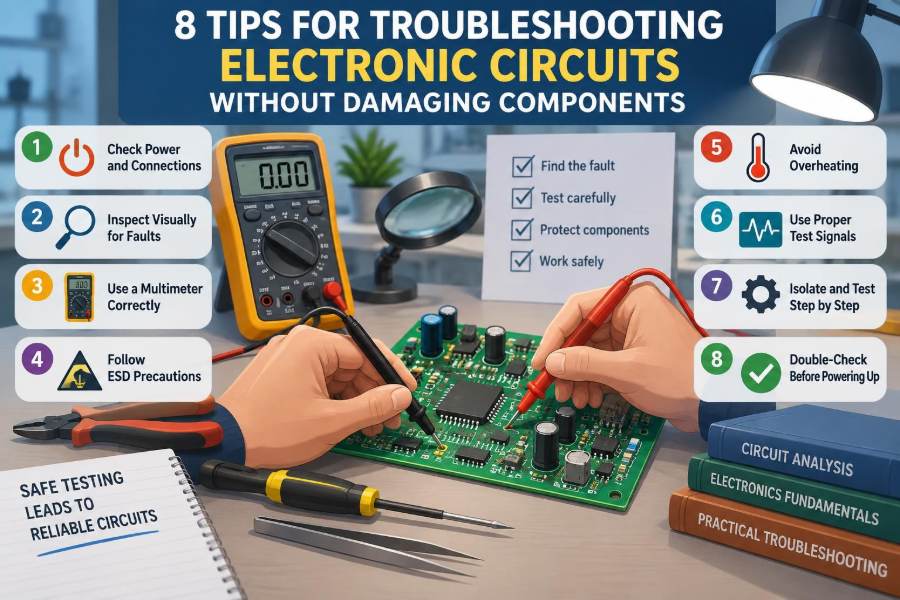
The eight tips below are supported by practical habits that make each measurement more meaningful. They will not replace an understanding of the circuit, but they will help protect components while that understanding is built.
🧭 Start With a Defined Expected Behavior
Before probing anything, write down what the circuit is supposed to do. “It does not work” is too broad to test. A better statement is: “With a 5 V input, the regulator should produce 3.3 V, and the microcontroller’s status LED should blink after reset.”
Break the expected behavior into stages: power entering the board, regulation, reference voltages, control signals, and output action. This turns troubleshooting into a comparison between an expected state and a measured state rather than a search based on guesswork.
📘 Read the Schematic Before Touching the Board
The schematic explains electrical intent; the physical layout shows where that intent was implemented. Trace the functional path from input to output and identify components that can interrupt it, such as fuses, connectors, switches, jumpers, regulators, and enable pins.
Do not assume a board matches the schematic perfectly. Revision changes, alternate component footprints, and hand wiring can alter a prototype. Use the schematic as a hypothesis, then confirm connections with inspection and continuity testing.
🔍 Tip 1: Inspect Before Applying Power
A careful visual inspection is the lowest-risk diagnostic tool. Look under bright, angled light; a solder bridge, cracked joint, rotated diode, or whisker of wire is often much easier to see than to infer from voltage readings.
- Check polarized parts: electrolytic capacitors, diodes, LEDs, transistor packages, and IC pin 1 orientation.
- Look for bridged pads, missing parts, lifted copper, and solder joints that have not wetted both pad and lead.
- On breadboards, verify that holes believed to be connected actually share the same internal strip.
- Check connector keys and cable color conventions, but do not rely on colors alone.
Inspection is especially valuable after rework. A fault introduced while replacing one component is common because neighboring pins, fine traces, and heat-sensitive packages are disturbed at the same time.
🧩 Confirm the Component Identity
Many packages look alike while having different pinouts or electrical ratings. A voltage regulator, transistor, MOSFET, and diode can all be installed incorrectly if identification is based only on package shape.
Read the part marking, then compare the datasheet pinout to the actual board orientation. Also verify resistor codes and capacitor markings where practical. A misplaced 10 kΩ resistor may not visibly fail, yet it can prevent a reset circuit, bias network, or feedback loop from functioning.
⚡ Tip 2: Use a Current-Limited Power Source
When a circuit has an unknown fault, a bench supply with an adjustable current limit is one of the best protections available. Set the correct nominal voltage, then begin with a conservative current limit appropriate to the circuit’s expected idle consumption.
If the supply immediately enters constant-current mode, the board is demanding more current than allowed. Turn the supply off and investigate; do not simply raise the limit until the voltage reaches its target. The low voltage is a symptom of the limit responding, not evidence that the circuit needs more voltage.
🔌 What current limiting can reveal
| Observation | Likely interpretation | Safe next action |
|---|---|---|
| Current rises sharply at power-on | Short circuit, reversed part, or damaged semiconductor may be present | Remove power and inspect power rails |
| Current is near zero | Open fuse, bad cable, open switch, or disconnected return path | Trace the supply path with continuity checks |
| Current is plausible but output is absent | Power may be present while control or signal stages fail | Measure rail and enable/reset states |
A simple USB supply, wall adapter, or battery generally cannot provide this controlled fault protection. They may have protection features, but those are not a substitute for a deliberate diagnostic current limit.
🌡️ Watch for Heating Without Using Your Fingers
Unexpected heat often points toward excessive current, but touching a powered board is a poor first method. You can burn your finger, short adjacent nodes with jewelry or a probe, and miss a component that heats too quickly to touch safely.
Instead, use an infrared camera, a non-contact thermometer, or a cautious airflow test if appropriate. Thermal tools need interpretation: shiny metal surfaces can give misleading infrared readings, so compare locations and confirm with electrical measurements.
If a component is heating, remove power before deciding what it means. The hot component may be the fault, but it may also be the part absorbing energy because another stage is shorted or miswired.
⏻ Verify Every Power Rail First
A surprising number of apparent logic, analog, and firmware problems are power problems. Measure each rail relative to the intended circuit ground at the pins where critical ICs receive power, not only at the supply connector.
Check for the expected voltage, correct polarity, and a solid return path. A regulator output can look correct at no load but collapse when the circuit starts; a connector may have voltage while a fractured trace prevents it from reaching the load.
For multi-rail systems, check sequencing and enable conditions when the design requires them. Some devices should not receive an input signal before their supply rail is established, and some regulators need a specific enable state before producing output.
📏 Tip 3: Measure Voltage With a Deliberate Reference
A voltage is always a difference between two points. The black meter lead is not a passive accessory; it defines the reference for the reading. Connect it to the correct local ground or specified reference node and keep it secure.
Probe a node with the red lead, read the result, and compare it with a stated expectation. Avoid sweeping a sharp probe tip across a crowded IC package. One slip can connect a supply pin to a data pin or ground and damage the device.
- Use hook clips or grabber probes for stable rails when possible.
- Expose only a small amount of metal at a probe tip in dense assemblies.
- Keep one hand away from the circuit when working around potentially hazardous voltages.
- Never let a meter setting become an assumption; verify the function and input jack before contact.
🧪 Know What a Multimeter Cannot Show
A digital multimeter is excellent for DC voltage, resistance, continuity, and slow changes. It is not the right instrument for proving that a fast clock, PWM waveform, switching regulator ripple, or digital bus is healthy.
For time-varying signals, use an oscilloscope when available. A logic analyzer is useful for digital protocols, while a signal generator can test whether an amplifier or filter responds to a known input. Selecting the tool prevents false conclusions from a perfectly valid—but unsuitable—measurement.
🔌 De-Energize Before Resistance and Continuity Tests
Resistance and continuity modes inject a small test signal from the meter. Applying them to an energized circuit can produce incorrect readings and may damage the meter or circuit, depending on the instrument and circuit voltage.
Turn power off, disconnect external sources, and allow capacitors to discharge before using these modes. Large capacitors can retain energy longer than expected; verify the voltage is near zero with the meter’s voltage mode before handling the board.
Also remember that an in-circuit resistance reading reflects every parallel path. A low reading does not automatically prove one resistor is wrong, and a diode test can be influenced by surrounding semiconductors.
🛡️ Tip 4: Protect Sensitive Devices From Static Electricity
Electrostatic discharge, or ESD, is a sudden transfer of charge between objects at different electrical potentials. You may not feel it, yet it can damage MOSFET gates, CMOS logic inputs, and some RF components or weaken them enough to cause later failure.
Use grounded ESD protection where the component sensitivity and work environment justify it: a grounded mat, wrist strap, conductive storage, and humidity-aware handling practices. At a minimum, discharge yourself appropriately, avoid handling pins, and keep sensitive parts in protective packaging until needed.
ESD controls reduce risk; they do not make every surface or tool safe automatically. Verify that a wrist strap and mat are correctly connected according to their instructions rather than attaching them casually to an unknown point.
🧱 Divide the Circuit Into Functional Blocks
Complex circuits become manageable when divided into blocks: input protection, power conversion, sensing, processing, communication, and output drive. Test the output of one block before moving to the next.
Consider a motor controller that does not run. Rather than testing every part at once, verify supply voltage, then logic supply, then controller enable, then command input, then gate-drive activity, and finally motor connections. Each passing stage eliminates a category of faults.
✂️ Isolate Loads Before Blaming the Supply
A supply rail that falls under load may be caused by a defective regulator, but the load could be the real issue. Disconnect removable loads such as motors, displays, daughterboards, or external cables and test the rail again within the design’s safe conditions.
If the rail recovers after removing a load, inspect that load and its wiring. If it remains low with the load removed, focus on the supply path, regulator feedback network, input voltage, and possible short on the remaining board.
Isolation must be done thoughtfully. Do not disconnect a load that provides required feedback, sensing, or a minimum load unless the component documentation permits operation without it.
🧷 Tip 5: Change One Variable at a Time
Replacing several parts, changing firmware, moving jumpers, and adjusting the supply all at once may appear productive. It destroys diagnostic information. If the circuit starts working, you will not know why; if it fails differently, the original fault is now obscured.
Make one controlled change, record it, and repeat the relevant measurement. This is the engineering version of a controlled experiment: preserve everything that is not being tested so the result has a clear meaning.
🗒️ Record Measurements and Conditions
A troubleshooting log can be simple: date, board revision, supply setting, current draw, test point, measured value, instrument, and observed behavior. A photo with test points marked is often useful, especially on prototypes with dense wiring.
Record conditions as well as readings. A circuit that fails only after warm-up, only with a particular cable, or only when a peripheral is connected has already provided valuable narrowing evidence.
🔗 Check Grounds and Return Paths
Ground is not magic zero volts everywhere. It is a conductor with resistance and inductance, so current flowing through it can create voltage differences between locations. High-current motors and switching loads can disturb the reference used by sensitive analog or digital sections.
Verify physical ground continuity, connector returns, and the intended common reference between instruments and the circuit. A missing return can make a signal appear absent even when its source is driving correctly.
Be cautious with bench oscilloscope ground clips. On many mains-powered scopes, the ground clip is connected to protective earth. Clipping it onto a non-ground point can create a destructive short. Use appropriate isolated or differential measurement methods when the circuit requires them.
📊 Tip 6: Compare Signals to Their Valid Operating Range
A signal is not simply “high,” “low,” or “present.” Ask whether its voltage, timing, polarity, impedance, and noise level meet the receiving device’s requirements. A 2 V output might look active on a meter but fail to satisfy a logic input expecting a higher valid level.
Datasheets define conditions such as input thresholds, absolute maximum ratings, recommended supply ranges, and timing limits. The absolute maximum rating is a damage boundary, not a normal operating target. Design and troubleshooting measurements should generally be evaluated against recommended operating conditions.
⏱️ Use an Oscilloscope Safely and Purposefully
Set the probe attenuation correctly on both the probe and scope, and compensate a passive probe before relying on waveform shape. Use a short ground spring or very short ground connection when examining fast edges; a long ground lead can pick up noise and create ringing that is mostly a measurement artifact.
Start with a conservative voltage scale and time base, then zoom in. Verify that the probe’s voltage rating is adequate for the node being measured. An oscilloscope can reveal a regulator oscillating, a reset pulse that never releases, or a clock that is missing, but only when the probing method does not significantly distort the circuit.
🧠 Tip 7: Respect Inputs, Outputs, and Unpowered ICs
Do not drive a signal into an unpowered IC unless the documentation specifically allows it. Current can flow through internal protection structures into the supply rail, causing misleading partial power-up or damaging the input circuitry.
Likewise, do not connect two active outputs together. A microcontroller pin configured as a push-pull output can fight an external driver if both attempt opposite logic levels. Add series resistance, use the correct interface mode, or isolate the signal before testing.
When using an external signal generator, begin with a low, known-safe amplitude, suitable offset, and a defined ground relationship. Check whether the target input expects logic-level, analog, AC-coupled, or high-impedance drive.
🧯 Recognize When Capacitors Change the Risk
Capacitors store energy. A large electrolytic capacitor can discharge rapidly into a short, producing heat, sparks, or damaged traces even after its supply is removed. High-voltage capacitors require procedures and equipment appropriate to their energy and application.
Use a suitably rated discharge method rather than shorting a capacitor with a screwdriver. Then confirm residual voltage with a meter. Small capacitors are usually less hazardous, but their effect on circuit behavior can still be significant in timing, filtering, decoupling, and regulator stability.
🧰 Use Substitute Parts Carefully
A replacement that fits physically may not behave electrically. Check voltage rating, current capability, power dissipation, tolerance, polarity, pinout, package thermal performance, and frequency behavior where relevant.
For example, a generic capacitor may have the correct capacitance but unsuitable equivalent series resistance for a particular regulator. A substitute transistor may have reversed pin order or insufficient gate-drive compatibility. Substitution is useful when it is informed, not when it is merely convenient.
🧼 Rework With Heat Control
Excessive soldering heat can lift pads, damage plastic connectors, degrade semiconductors, or weaken nearby joints. Use the right tip size, flux, and temperature for the joint, and apply heat for only as long as needed to form a sound connection.
After rework, inspect for bridges and clean residues when they could affect high-impedance or high-voltage areas. Let components cool before retesting; some faults are temperature dependent, and immediate retesting can mask whether a change or residual heat altered the result.
🚫 Avoid Common “Quick Fix” Habits
Several habits feel efficient but add risk or confusion:
- Increasing supply voltage to “push through” a fault.
- Bypassing a fuse or protection resistor without understanding why it opened.
- Replacing parts based solely on suspicion.
- Using continuity mode on a live board.
- Probing tightly spaced pins with uninsulated sharp tips.
- Assuming a hot component is always defective.
A protection device that trips is evidence. Find what caused the abnormal condition before restoring full power, or the replacement part may fail immediately as well.
🔄 Retest After Every Repair
A repair should be verified progressively. Begin with inspection, then power the circuit through a current-limited source, confirm idle current and supply rails, and finally restore normal inputs and loads one stage at a time.
This sequence catches a solder bridge or incorrect replacement before the board is returned to full operating stress. It also distinguishes a repaired fault from a coincidental symptom change.
📚 Build a Reusable Troubleshooting Checklist
A written checklist reduces omissions when deadlines are tight. Adapt it to the types of circuits you work on, but keep the order safety-oriented: inspect, make safe, power carefully, validate rails, isolate blocks, measure signals, document, and retest.
Over time, your notes become a local knowledge base. Repeated mistakes—such as a connector pinout that is easy to reverse or a regulator requiring a particular capacitor placement—can be prevented in future designs as well as fixed in current ones.
🏁 The Core Principle: Gather Evidence Without Adding Faults
Safe troubleshooting is a balance between curiosity and restraint. The goal is not to take the most measurements; it is to take the next measurement that most clearly separates plausible causes while exposing the circuit to the least additional risk.
The eight practical tips form a reliable pattern: inspect first, control power, use the correct measurement method, protect sensitive devices, isolate sections, make one change at a time, respect electrical limits, and verify repairs progressively. When evidence guides each step, even a frustrating fault becomes a solvable sequence of smaller questions.
The most effective troubleshooters protect the circuit first, then let careful measurements reveal the fault. That approach saves components, time, and confidence on the next difficult board. 🔌🧪🛠️