
Electronics power our world, from smartphones and computers to home appliances and robots. But how do electronic components work together to create these amazing devices?
If you’re new to electronics, this guide will take you through the basic concepts, components, and circuits you need to get started. Whether you want to build your own gadgets, repair electronics, or dive into robotics, this is your first step into the exciting world of electronics! 🚀🔧
1. What is Electronics? 🤔⚡
Electronics is the branch of physics and engineering that deals with circuits, electrical components, and signals. Unlike electrical systems (which focus on power distribution), electronics control and process information using tiny components like transistors and microchips.
🔹 Why Learn Electronics?
✅ Create DIY projects like LED displays and Arduino-based robots.
✅ Understand how gadgets work—from TVs to mobile phones.
✅ Repair and troubleshoot electronic devices.
✅ Kickstart a career in engineering, robotics, or IoT development.
📍 Example: When you press a TV remote button, an electronic circuit inside converts your command into an infrared signal that the TV receives!
2. Basic Electronic Concepts 🧠📚
Before diving into circuits, let’s cover some fundamental electrical principles.
🔹 1. Voltage (V) 🔋
Voltage is the “push” that moves electrons through a circuit. It is measured in volts (V).
📍 Example: A 9V battery supplies 9 volts to a circuit.
🔹 2. Current (I) 🔄
Current is the flow of electric charge in a circuit. It is measured in amperes (A or mA).
📍 Example: A 1A (amp) current flows when a strong power source moves electrons through a conductor.
🔹 3. Resistance (R) 🛑
Resistance controls how much current flows. It is measured in ohms (Ω). Higher resistance reduces current flow.
📍 Example: A resistor in an LED circuit limits current, preventing the LED from burning out.
✅ Ohm’s Law: Voltage = Current × Resistance (V = I × R)
3. Essential Electronic Components 🏗️🛠️
Every electronic device consists of basic components that control voltage, current, and signals.
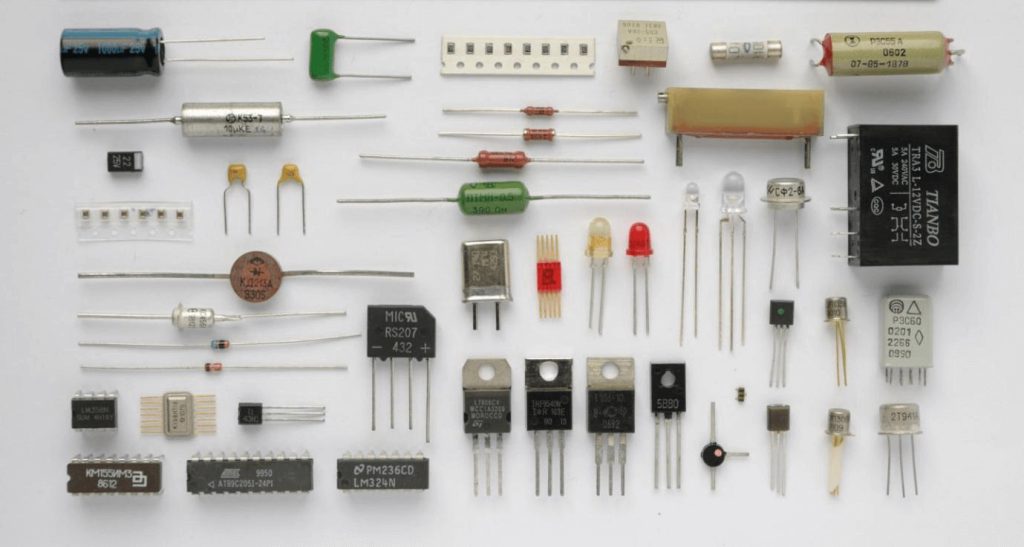
🔹 1. Resistors (🔴🟠🟡) – Control Current
✅ Reduce current flow and protect components.
✅ Identified by color-coded bands (Ohm values).
📍 Example: A 330Ω resistor prevents an LED from drawing too much current.
🔹 2. Capacitors (⚡) – Store Electrical Energy
✅ Store and release electrical charge.
✅ Used in power supplies and audio circuits.
📍 Example: Flash circuits in cameras use capacitors to store and release energy quickly.
🔹 3. Diodes (⬆️) – One-Way Current Flow
✅ Allow current to flow in one direction only.
✅ Protect circuits from voltage spikes.
📍 Example: LEDs (Light Emitting Diodes) are a type of diode that emits light when current flows through.
🔹 4. Transistors (⚡➡️🔄) – Act as Switches & Amplifiers
✅ Used in almost every modern electronic device.
✅ Control signals and power in circuits.
📍 Example: Transistors in smartphones process signals to make calls, run apps, and connect to WiFi.
🔹 5. Integrated Circuits (ICs) – Mini Computers
✅ Contain multiple components (transistors, resistors, capacitors) in one tiny chip.
✅ Used in microcontrollers, sensors, and computers.
📍 Example: The 555 Timer IC is used in clocks, alarms, and LED blink circuits.
4. How to Build a Simple Circuit 🛠️🔌
Let’s create a basic LED circuit using a battery, resistor, and LED.
🔹 Components Needed:
✅ 1 LED (any color)
✅ 1 Resistor (330Ω)
✅ 1 Battery (9V or AA 1.5V)
✅ Wires & Breadboard
🔹 Steps:
1️⃣ Connect the LED’s long leg (+) to a resistor.
2️⃣ Connect the other resistor leg to the battery’s positive terminal (+).
3️⃣ Connect the LED’s short leg (-) to the battery’s negative terminal (-).
4️⃣ Turn on the power—the LED should light up! 💡
📍 Tip: If the LED doesn’t light up, check polarity (LEDs only work in one direction).
5. Tools You Need to Get Started 🛠️⚙️
If you want to build electronics projects, here are some must-have tools:
✅ Multimeter – Measures voltage, current, and resistance.
✅ Soldering Kit – Used to permanently connect components.
✅ Breadboard – Helps test circuits without soldering.
✅ Arduino/Raspberry Pi – Microcontrollers for smart projects.
✅ Jumper Wires & Power Supply – Connect components easily.
📍 Tip: Start with breadboard circuits before soldering for easy troubleshooting!
6. Next Steps: How to Advance in Electronics 🚀
Once you master the basics, expand your skills by working on real-world projects!
🔹 Beginner-Friendly Project Ideas:
✅ Flashing LED Circuit – Learn about timers and resistors.
✅ Temperature Sensor with Arduino – Build a simple weather station.
✅ Basic Robot (Line-Follower) – Control motors with a microcontroller.
✅ DIY Bluetooth Speaker – Learn about amplifiers and audio circuits.
📍 Tip: Websites like Instructables, SparkFun, and Adafruit offer great DIY project guides!
7. Conclusion: Start Your Electronics Journey Today! 🏆
Electronics is a fascinating and rewarding field that lets you create, innovate, and solve real-world problems. By understanding basic components, circuits, and tools, you can start building your own electronic devices today!
🔹 Key Takeaways:
✅ Electronics involves circuits, voltage, current, and resistance.
✅ Basic components like resistors, capacitors, and transistors control electricity.
✅ Microcontrollers (Arduino, Raspberry Pi) allow smart automation.
✅ Building circuits is easy—start with LEDs and simple projects!
🚀 Want to take the next step? Get an Arduino kit and start experimenting today!