
A computer that restarts while saving a file, a monitor that takes several tries to wake up, or a network switch that drops out only on hot afternoons can feel like unrelated faults. Often, however, the problem begins at the same place: the power supply.
Power supplies do more than turn equipment on. They convert, regulate, filter, and distribute energy so that every circuit receives voltage within a usable range. When that process degrades, the first symptoms can be intermittent and misleading.
This matters to users, technicians, and designers alike. Catching a weakening supply early may prevent corrupted data, unnecessary board replacement, heat damage, or an abrupt shutdown during a critical task.
A symptom is not a diagnosis. Many failures resemble software bugs, loose connectors, overheating, or failing loads. The useful skill is learning which clues point toward power integrity and how to investigate without creating a shock, fire, or equipment-damage hazard.
⚡ What a Power Supply Actually Does
A power supply unit (PSU) accepts an input source and delivers one or more controlled outputs. In mains-powered equipment, this usually means converting AC line voltage into isolated, lower-voltage DC rails. In battery-powered products, it may boost, buck, charge, protect, and monitor battery power.
Its quality is not defined only by its printed wattage. A healthy supply must maintain the correct voltage, deliver current when demand changes, limit ripple and noise, survive normal temperature conditions, and respond safely to faults.
🧩 Why Power Faults Mimic Other Problems
Digital circuits make decisions using voltage thresholds. If a supply rail dips briefly, a processor may reset, memory may misread data, or a peripheral may disconnect—without leaving an obvious “power failure” message.
That is why a machine can appear to have a driver, storage, or motherboard problem when its real weakness is power delivery. The symptom often occurs where the system is most sensitive, not where the fault originates.
🚦 Intermittent Starting and Failed Boot Attempts
Repeated attempts to start are among the most recognizable early warnings. A device may click, flash an LED, begin booting, then immediately switch off; another attempt a few minutes later may succeed.
At start-up, input capacitors charge and motors, fans, and processors can create a high temporary demand. A supply with reduced capacitance, a weak switching stage, or excessive resistance in a connection may not support that surge.
Do not assume every no-start condition is the PSU. A shorted downstream rail, failed battery, damaged power button, or loose mains lead can produce similar behavior.
🔄 Random Resets During Normal Use
An unexpected restart under load is a strong reason to check the power path. Common trigger points include launching a demanding application, printing, spinning up a drive, transmitting at high radio power, or connecting several USB devices.
A reset differs from a graceful shutdown. The operating system may not have time to save logs or close files, because a supervisor circuit detects undervoltage or the processor simply loses stable power.
💡 Flickering Displays and Unstable Lighting
Displays, LED drivers, and backlights can reveal supply trouble because their output is visibly related to power regulation. Brightness may pulse, the picture may blink when a load changes, or the screen may take time to become stable.
Flicker can also come from the panel, cable, dimming control, or external mains conditions. A useful clue is correlation: if flicker happens when the device’s fan, disk, heater, or other load activates, investigate the supply first.
🎵 Audible Clues: Buzzing, Whining, and Clicking
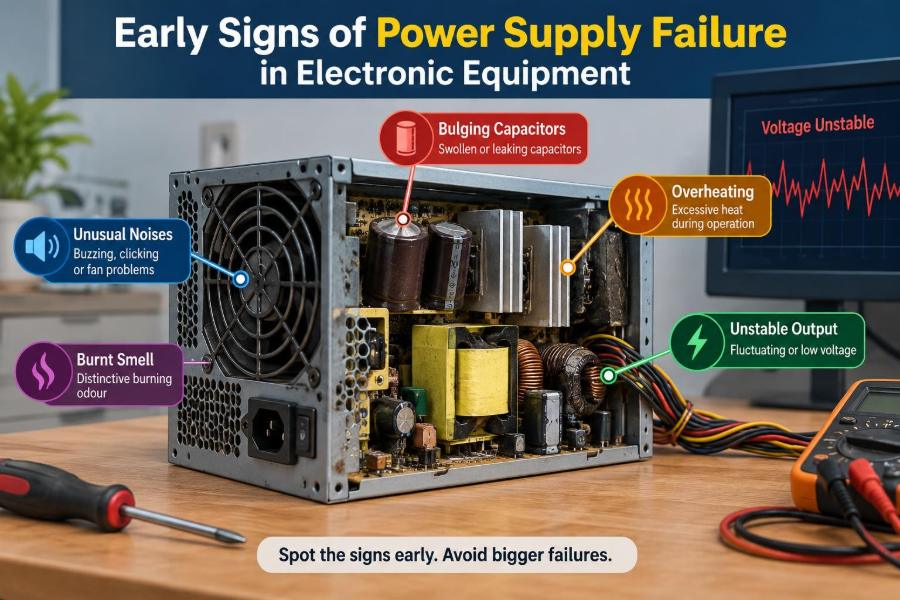
Some supplies make a faint high-frequency sound during normal operation, particularly under changing load. That alone does not establish failure. But a new, changing, or unusually loud buzz deserves attention.
Transformer vibration, loose magnetic components, overloaded converters, or aging capacitors can contribute to audible noise. Repeated clicking may be a protection circuit attempting to start, detecting a fault, and shutting down in a cycle.
Never open a mains PSU merely to identify a sound. Hazardous voltage can remain on internal capacitors after unplugging.
🌡️ Excessive Heat Around the Supply
All conversion has losses, so warmth is normal. The concern is a clear change: a casing that becomes much hotter than before, a fan exhaust that is unusually hot, or thermal shutdown after moderate work.
Heat accelerates the aging of electrolytic capacitors and stresses semiconductors. It also raises resistance in conductors and connectors, creating a feedback loop in which hotter parts waste more energy.
Check ventilation first. Dust-clogged vents, blocked intakes, failed fans, and installation near a heat source can make a healthy supply behave poorly.
🌀 A Fan That Does Not Behave Normally
A fan that never spins, runs roughly, surges repeatedly, or makes bearing noise may cause power-supply overheating. In some modern designs, the fan intentionally remains off at light load, so confirm the design before calling it defective.
Look for a change from the equipment’s normal behavior. A fan that begins cycling frequently during a workload that was previously quiet can indicate rising internal temperature or reduced efficiency.
📉 Voltage Droop Under Load
Voltage droop is a reduction in output voltage when current demand increases. Every practical supply has some load response, but regulation should remain within the requirements of the equipment it serves.
For example, a bench supply might show the correct output with no load, yet sag when a motor starts. An unloaded measurement is therefore reassuring only to a limited extent. The supply must be assessed under realistic, safe load conditions.
〰️ Ripple and Noise on DC Rails
DC output is never perfectly flat. Ripple is the residual periodic variation left after conversion and filtering; noise includes higher-frequency disturbances caused by switching edges and other sources.
As filter capacitors age, ripple can increase. Sensitive analog circuits may produce hum or distortion, while digital circuits may become unstable even if a basic multimeter still reports the nominal average voltage.
An oscilloscope with appropriate probing technique is usually needed to evaluate ripple properly. Measuring it badly can pick up external interference and lead to a false conclusion.
🔋 Battery Problems That Look Like PSU Failure
Portable equipment adds another layer: the battery, charger, charge-management circuit, and DC-DC converters all share responsibility for stable power. A swollen, aged, or damaged battery can cause shutdowns when current demand rises.
Conversely, a faulty charger or charge path may make a good battery appear defective. Compare behavior on approved external power and battery power where the manufacturer’s guidance permits it.
Stop using a battery that is swollen, leaking, unusually hot, or physically damaged. It is a safety issue, not a component to keep testing.
🔌 Loose Connectors and High-Resistance Contacts
A connector can look plugged in while making poor electrical contact. Oxidation, weak spring force, damaged pins, contamination, and partially seated plugs increase contact resistance.
Under load, that resistance produces voltage loss and heat. A simple relation explains why: power dissipated at a resistance rises with the square of current, expressed as P = I²R. A small connection defect can become significant on a high-current path.
Inspect for discoloration, softened plastic, loose fit, or localized warmth only after safely powering down. Replace damaged connectors rather than trying to compensate with force or improvised materials.
🧯 The Meaning of Protection-Circuit Trips
Good supplies commonly include overcurrent, overvoltage, overtemperature, and short-circuit protection. A shutdown can therefore be evidence that protection is working, not necessarily proof that the PSU itself has failed.
The key question is what caused the trip. A failing supply may trip because it cannot regulate correctly, but a damaged cable or shorted load can trigger the same response immediately.
- Trips only with one peripheral connected: suspect that peripheral or its cable.
- Trips after warming up: investigate cooling, load level, and aging components.
- Trips even with outputs disconnected where safe and applicable: the supply itself becomes more suspect.
🧪 Testing Without a Load Can Mislead You
Many switched-mode supplies regulate differently at zero load, light load, and rated load. Some require a minimum load on a particular rail; others enter burst or standby modes that confuse simple measurements.
A “correct” no-load voltage does not prove adequate current capacity or transient response. Use a suitable electronic load, power resistor, or known-good equipment only if the test is within your training, instrument rating, and safety limits.
📏 Using a Multimeter Correctly
A digital multimeter is excellent for checking continuity, input voltage, average DC output, and obvious voltage loss. Verify meter leads, range selection, polarity, and reference point before trusting a reading.
Measure at more than one location when possible: at the supply output and at the load input. A good reading at the PSU but a low reading at the board points toward cable or connector loss.
Remember that a multimeter averages over time. It may miss millisecond-scale dips that reset digital hardware.
📈 When an Oscilloscope Is Worth Using
An oscilloscope becomes valuable when symptoms are load-dependent, sporadic, or related to analog quality. It can reveal ripple, switching bursts, startup overshoot, dropouts, and transient sag that a meter hides.
Grounding requires special care. A conventional earth-referenced scope probe can create a dangerous short if attached incorrectly to non-isolated mains circuitry. Work only on accessible low-voltage isolated outputs unless you are qualified and using the appropriate isolated measurement method.
👃 Smell, Stains, and Visible Component Damage
A sharp burnt odor, brown residue, cracked components, or bulging capacitor vents can support a failure diagnosis. These signs are useful, but their absence proves very little; many electrical faults leave no visible mark.
Bulging electrolytic capacitors should be treated as failed or suspect components. Yet replacing only the visibly damaged part can be incomplete repair if heat, ripple current, poor airflow, or another failed component caused the stress.
⚙️ Capacitor Aging and Its Effects
Electrolytic capacitors gradually lose effective capacitance and gain equivalent series resistance (ESR), an internal resistance that limits their ability to filter and deliver pulsed current. Heat is a major contributor to this aging process.
The result may be slow startup, increased ripple, audible noise, or instability only after the unit warms. Capacitors are common failure points, but they are not the only ones; transformers, optocouplers, rectifiers, solder joints, and control ICs can also degrade.
🧲 Problems on the Input Side
Not every power problem originates inside the device. A loose wall outlet, damaged extension lead, undersized power strip, incorrect supply selector, poor generator output, or voltage sag on a shared circuit can affect equipment.
Test with a known-good outlet and approved cable before replacing internal parts. For critical systems, a properly selected uninterruptible power supply or conditioned power source may help with outages and some input disturbances, but it cannot repair a failing internal PSU.
🏭 Load Growth and Hidden Overload
A supply may have worked for years until the system changed: more drives, an upgraded graphics card, extra lighting, a higher-power radio module, or a peripheral drawing more USB current than expected.
Compare the supply’s continuous ratings with the real demand, including startup and peak conditions. Nameplate output ratings must be interpreted rail by rail; a large total wattage figure does not guarantee sufficient current on every output.
🧠 Firmware, Software, or Power: Separating the Clues
Software faults often follow a particular application, configuration, or operating-system event. Power faults more often correlate with load, temperature, physical movement, or broad symptoms across unrelated functions.
This is only a pattern, not a rule. A disciplined approach changes one variable at a time: remove nonessential peripherals, test a known-good supply where compatible, examine event logs, and reproduce the workload that triggers the issue.
🖥️ Different Equipment, Different Warning Patterns
| Equipment | Early pattern | Useful first check |
|---|---|---|
| Desktop computer | Resets during graphics or storage load | Check rails, connectors, cooling, and load budget |
| Monitor or TV | Delayed startup, flicker, repeated power cycling | Inspect cable, outlet, ventilation, and service history |
| Router or switch | Random reboot, ports dropping, warm adapter | Try an approved known-good adapter with matching ratings |
| Industrial controller | Intermittent I/O faults or unexplained resets | Measure supply at controller during machine operation |
Equipment-specific behavior matters. A failing external adapter is often easier and safer to substitute than an internal mains supply, provided output voltage, polarity, connector, current capability, and regulatory requirements all match.
🛠️ A Practical Diagnostic Sequence
- Record the symptom, timing, load condition, and any heat or sound changes.
- Inspect external cables, plugs, vents, fuses, and connectors with power removed.
- Eliminate obvious input issues using a known-good outlet and approved lead.
- Reduce the load by disconnecting nonessential accessories.
- Measure accessible low-voltage outputs and compare at the supply and load.
- Test with a compatible known-good supply or known-good load when safe.
- Escalate to ripple, thermal, and component-level tests only with suitable skills and tools.
This sequence avoids a common trap: replacing expensive boards before checking inexpensive external causes.
🚫 Common Mistakes During Troubleshooting
One mistake is treating the printed output voltage as the whole story. Current capability, ripple, transient response, and connector condition matter just as much.
Another is bypassing a fuse or protection circuit to “see if it works.” Fuses and shutdown features are safety controls. Bypassing them can turn a contained fault into damaged equipment, fire risk, or personal injury.
- Do not substitute an adapter with the wrong voltage or polarity.
- Do not use an unverified high-current supply simply because its plug fits.
- Do not probe exposed mains circuitry with ordinary low-voltage habits.
- Do not assume a replacement PSU is healthy without checking its specifications.
🧰 Repair, Replacement, or Professional Service
Replacement is often the sensible option for sealed adapters, consumer ATX units, and supplies where safe repair would require deep mains-power expertise. Choose a reputable unit with the correct electrical ratings and form factor.
Component-level repair can be appropriate in industrial, laboratory, legacy, or specialized equipment when performed by trained personnel. The repair should include root-cause assessment, not merely replacement of the first failed component found.
For medical, safety-critical, high-energy, or regulated equipment, follow the manufacturer’s service procedures and applicable workplace rules. Functional operation alone may not demonstrate that safety performance has been restored.
🧹 Prevention Through Heat and Load Management
Long service life begins with reasonable operating conditions. Keep vents clear, remove dust using a method appropriate for the equipment, maintain fan operation, and avoid enclosing supplies where hot exhaust recirculates.
Leave load margin rather than operating continuously at the edge of a supply’s rating. In designs, consider worst-case input voltage, ambient temperature, startup demand, cable loss, and capacitor aging—not just a typical bench measurement.
📝 Keeping Useful Failure Records
A short log can turn an elusive fault into a pattern. Note date, ambient temperature, workload, input source, attached peripherals, symptoms, measurements, and corrective actions.
For fleets of equipment, records reveal whether failures are tied to one batch, one installation area, one load type, or one maintenance condition. That is more actionable than replacing units individually without comparison.
🔍 Knowing When to Stop and Escalate
Stop troubleshooting if you see arcing, smoke, melted insulation, a swollen battery, liquid intrusion, severe overheating, or repeated fuse operation. Disconnect power where it is safe to do so and arrange qualified service.
Escalate early when mains voltage, high stored energy, critical uptime, or personnel safety is involved. Good engineering judgment includes recognizing when a measurement would add more risk than useful information.
✅ The Core Principle: Treat Power as a System
Power-supply diagnosis is not just about one box. The complete system includes the source, cable, connector, converter, cooling path, load, and the device’s response to disturbances.
Early signs such as resets, startup difficulty, flicker, heat, noise, and unstable readings become much more useful when linked to operating conditions. Check simple external causes first, measure thoughtfully, and test under realistic conditions rather than relying on one symptom or one no-load voltage reading.
The most reliable response to suspected power-supply failure is to observe patterns, protect safety systems, and verify the entire power path before replacing parts. That approach saves time, reduces guesswork, and helps equipment stay dependable. 🔌🛠️⚡