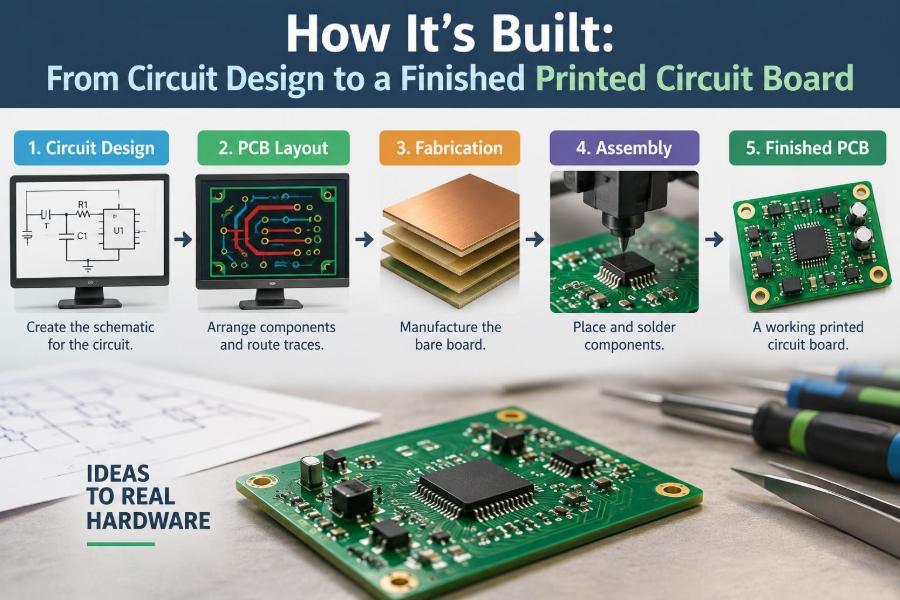

A phone charger that runs cool, a sensor board that records a measurement accurately, and a controller that survives a noisy factory floor may look like simple electronic products. Inside each is a printed circuit board, or PCB: a carefully planned physical system that connects components, carries power, manages heat, and moves signals where they need to go.
It is tempting to picture PCB development as drawing lines between parts and sending a file to a factory. In practice, those lines represent electrical behavior, manufacturing limits, mechanical constraints, test access, and sometimes safety requirements. A board can be electrically correct in a schematic yet still be difficult to assemble, unreliable, or too expensive to produce.
Understanding the journey from an idea to a finished PCB helps students connect circuit theory with real hardware. For working engineers, it also clarifies where design reviews, prototypes, and production feedback prevent costly revisions.
The process is iterative rather than perfectly linear. Still, following its usual sequence reveals why good boards are built through disciplined decisions long before copper is etched.
🧭 Start With the Product Requirement
A PCB project begins with a requirement, not with a footprint library. The requirement describes what the product must do and the conditions in which it must do it: input voltage, outputs, accuracy, size, operating temperature, connectors, cost target, and expected production quantity.
For example, “read a temperature sensor” is incomplete. A useful requirement also asks whether the sensor is remote, whether cables are long, whether measurements must be precise, and whether the product operates beside motors. Each answer changes the circuit and layout choices.
📋 Turn Needs Into Engineering Constraints
Requirements become constraints that can be checked. These may include a maximum board outline, a minimum battery operating time, allowable voltage ripple, maximum current, enclosure mounting points, and regulatory or safety obligations appropriate to the product.
A short constraint list prevents a common failure mode: optimizing one feature while quietly violating another. A very small board may be attractive, for instance, but it may leave inadequate room for heat dissipation, connectors, or assembly clearances.
🧩 Divide the Design Into Functional Blocks
Before selecting individual components, separate the system into blocks such as power input, voltage regulation, processor, sensing, communications, output drivers, and user interface. This is the bridge between a product idea and a readable schematic.
Block diagrams expose the important interfaces. They show where power enters, which circuits share a supply, and where analog, digital, and high-current functions meet. They also reveal missing functions early, such as reverse-polarity protection or programming access.
🔍 Choose Components for More Than Their Value
Component selection is not just choosing a resistor value or an integrated circuit with enough pins. Engineers examine voltage and current ratings, tolerance, package size, temperature range, lifecycle status, availability, and the manufacturer’s recommended operating conditions.
A capacitor illustrates the point. Its nominal capacitance alone does not describe its behavior. Dielectric type, voltage bias effects, equivalent series resistance, package, and placement can all influence how well it supports a regulator or filters a signal.
- Check absolute maximum ratings, but design to recommended operating limits.
- Confirm that the package can be assembled by the intended process.
- Identify parts with limited availability before the layout depends on them.
- Read reference circuits critically; they are starting points, not universal templates.
📚 Build Reliable Symbols and Footprints
A schematic symbol represents electrical connections, while a footprint represents the physical land pattern used on the board. The two are linked by a component record. An error in this record can turn a correct design into an unbuildable board.
Verify pin numbering against the component datasheet, not just a library name. Then compare the footprint pad layout, orientation mark, exposed pad, and courtyard with the manufacturer’s drawing. For unfamiliar packages, a printed scale check or mechanical review is often worthwhile.
✏️ Capture the Schematic Clearly
The schematic is the electrical contract for the PCB. It should communicate intent clearly enough that another engineer can trace power paths, understand signal names, and review design choices without guessing.
Use meaningful net labels, group related circuitry, and show required support components around integrated circuits. Long wires are not inherently wrong, but labels usually make multi-page designs clearer and reduce visual clutter.
🛡️ Design Power Entry and Protection First
Power entry is where a board meets real-world mistakes and disturbances. Depending on the application, the circuit may need a fuse or resettable protector, reverse-polarity protection, transient suppression, input filtering, and controlled inrush current.
The correct arrangement depends on the source and risk environment. A battery-powered hobby device and an industrial cabinet input face different hazards. Protection components must also be rated for the voltage, energy, and fault behavior they may encounter; adding a device symbol is not the same as providing protection.
⚡ Establish Power Rails and Current Budgets
List every supply rail and estimate both typical and worst-case current. Include startup behavior, radio transmit bursts, motor loads, LED currents, and current consumed through external connectors. This budget guides regulator selection, copper width, connector ratings, and thermal analysis.
Voltage regulators also require attention to dropout voltage, efficiency, compensation requirements, and heat. A linear regulator may be simple and low-noise, but dropping a large voltage at substantial current converts significant power into heat.
🧠 Add the Processing and Programming Path
Microcontrollers, FPGAs, and programmable devices need more than their main supply pin. They may need boot-mode resistors, reset circuitry, clocks, programming connectors, and decoupling capacitors placed according to the datasheet.
Plan how firmware reaches the product before routing begins. A compact board with no accessible programming pads can turn a small firmware update into a mechanical redesign. Test pads may offer a better production solution than a large connector.
🎛️ Treat Analog and Digital Interfaces Deliberately
Analog circuits deal with continuously varying voltages or currents, while digital circuits interpret defined logic levels. The two can coexist successfully, but the sensitive analog path should be identified early so it is not routed through a noisy power or switching region.
For a hypothetical load-cell amplifier board, the low-level sensor input deserves short, protected routing and a quiet reference path. The display and processor can be nearby, but their fast switching currents should not be forced through the measurement return route.
🌊 Understand Return Current Before Routing Signals
Every signal current travels out on a trace and returns by a path through the system. At higher edge rates, the return current tends to follow the signal closely through the reference plane because that minimizes loop inductance.
This is why an uninterrupted ground plane is so valuable. Routing a fast trace over a split, slot, or missing reference plane forces the return current to detour. The enlarged loop can worsen noise, radiation, and signal integrity.
🧪 Run Electrical Rule Checks Early
Electronic design automation tools can compare the schematic against defined rules. An electrical rule check, commonly called ERC, can flag unconnected pins, conflicting outputs, missing power indicators, and other suspicious conditions.
Warnings require engineering judgment. Some are intentional, but each should be understood rather than dismissed in bulk. A clean ERC report does not prove a circuit works; it means the captured connectivity is internally consistent with the chosen rules.
📐 Define the Board Outline and Mechanical Reality
The PCB outline must fit its enclosure, mounting hardware, connectors, buttons, displays, and cable bend space. Mechanical information often arrives as drawings or models, and it should be treated as a design input rather than a final packaging detail.
Keep-outs matter. A tall capacitor may collide with a lid, and a connector may be electrically correct but inaccessible after installation. Mounting holes should have suitable clearances, and any metal hardware should be considered in the electrical and grounding strategy.
🏗️ Select a Practical Layer Stackup
A stackup describes the copper and insulating layers of the PCB. A simple two-layer board is economical and suitable for many low-complexity products. Four or more layers provide dedicated planes and more routing freedom, often making power integrity and electromagnetic behavior easier to control.
| Board option | Useful when | Main trade-off |
|---|---|---|
| Two layers | Low-density, low-speed circuits with modest routing needs | Less continuous plane area and more routing compromises |
| Four layers | Mixed-signal, dense digital, or switching-power designs | Higher fabrication cost, though it can reduce layout time and risk |
| More than four layers | High pin-count devices, controlled impedance, or complex routing | More stackup coordination and fabrication detail |
Confirm the fabricator’s available stackups before committing to impedance-controlled or high-speed routing assumptions.
📦 Place Components Before Drawing Traces
Placement is one of the most consequential PCB tasks. Put connectors where users and cables need them, fix mechanically constrained parts first, then arrange circuits according to signal flow and power flow.
Keep decoupling capacitors close to their IC supply pins, place switching-regulator components tightly around the regulator, and separate noisy power stages from sensitive inputs. Routing cannot fully rescue poor placement; it usually only makes its consequences harder to see.
🟫 Create Solid Ground and Power Planes
Large copper areas assigned to ground are commonly called ground pours or planes. They provide a low-impedance return path, reduce voltage differences across the board, and often simplify routing. They are not magic shields, however.
A plane works best when it remains continuous beneath signals that need it. Avoid casually carving it into islands with traces or clearance regions. When a split is genuinely required, plan every signal crossing and return path rather than treating the split as a generic noise cure.
🧵 Route by Electrical Priority
Not every trace deserves the same attention. Route critical interfaces first: clocks, high-speed differential pairs, sensitive analog inputs, impedance-controlled lines, and high-current paths. Then route ordinary digital signals and low-risk control lines.
Trace width and spacing are electrical and manufacturing decisions. Wider copper reduces resistance and heating for power paths, while spacing helps meet voltage, noise, and fabrication requirements. Use the board manufacturer’s capabilities and applicable design rules instead of relying on a single universal width.
🔄 Handle Differential Pairs and Fast Edges Carefully
Differential signaling uses two traces that carry complementary signals. USB, Ethernet variants, and many high-speed interfaces depend on controlled impedance, pair coupling, and often length matching within limits defined by the interface.
Fast digital edges can need similar care even when the clock frequency seems modest. What matters is edge transition time and interconnect length. Avoid unnecessary vias, stubs, sharp reference-plane changes, and mismatched routes where the relevant interface guidance warns against them.
🔥 Design for Heat, Not Just Electrical Operation
Components dissipate heat whenever voltage and current produce power loss. Regulators, MOSFETs, LEDs, drivers, and resistive loads can become thermal limits even when their electrical ratings appear adequate.
Copper area can spread heat, thermal vias can move it between layers, and airflow or enclosure contact may help. But estimates must account for the real environment. A board that is comfortable on an open bench may run much hotter in a sealed enclosure.
📏 Apply Manufacturing Design Rules
Design for manufacturability, or DFM, means drawing a board that a fabricator and assembler can produce consistently. Minimum trace width, spacing, drill size, annular ring, solder-mask clearance, and copper-to-edge spacing all depend on the chosen manufacturing process.
Use the actual supplier’s capabilities when possible. A layout that works at a prototype service may not meet the yield or cost needs of volume production. Conservative rules can improve robustness, but overly conservative rules may make a compact design unnecessarily difficult.
🤖 Make Assembly Straightforward
Design for assembly considers how parts are placed and soldered. Consistent component orientation helps inspection and machine programming. Clear polarity markings help humans avoid mistakes, while appropriate pad sizes and solder-mask design support reliable joints.
Check whether parts are compatible with reflow soldering, wave soldering, hand assembly, or a combination. Through-hole connectors can add mechanical strength, but they may require selective soldering or a separate assembly step in some production flows.
🧷 Include Test Points and Debug Access
A finished board needs to be tested, not merely admired. Add accessible points for ground, major supply rails, reset, programming, and signals likely to be inspected during bring-up. Label them clearly in the silkscreen or assembly documentation where space allows.
For production, test points can support fixtures with spring-loaded probes. For prototypes, they make an oscilloscope or multimeter connection much safer than touching a fine-pitch IC pin. A test strategy also helps determine what faults can realistically be isolated.
📝 Add Useful Silkscreen and Documentation
Silkscreen is the printed identification layer on a PCB. It can show reference designators, polarity, connector functions, board revision, and cautions. Useful markings reduce assembly errors and accelerate troubleshooting.
Documentation extends beyond the board image. A release package typically includes fabrication data, assembly drawings, a bill of materials, pick-and-place data where needed, and notes defining approved substitutions or special processes. Version control matters because a small undocumented change can create mixed hardware revisions.
✅ Perform Layout Review and Design Rule Checks
Before export, run the layout design rule check, or DRC. It searches for physical-rule violations such as insufficient clearances, unconnected nets, missing vias, or copper features that are too close to other objects.
Then conduct a human review. Reviewers should follow current paths, inspect connector pinouts, compare footprints with datasheets, check polarity, and zoom into dense areas. A checklist is valuable because common errors are mundane: reversed connectors, swapped pins, missing pull resistors, and unreadable markings.
📤 Generate Fabrication and Assembly Data
The manufacturer does not receive an editable layout as the primary instruction. The release package contains standardized manufacturing outputs, commonly including Gerber or equivalent image data for layers, drill files, and a clear fabrication drawing.
Assemblers also need a bill of materials with exact part identifiers and approved alternatives, along with centroid or pick-and-place information when automated placement is used. Inspect exported files in an independent viewer; this catches layer mapping, drill, and polarity-marking mistakes before money is committed.
🏭 From Bare Board to Populated PCB
PCB fabrication starts with copper-clad laminate. The desired copper pattern is transferred to the panel, unwanted copper is removed or otherwise processed, holes are drilled, plated features are formed where required, and protective and identification layers are added.
Assembly then places components on pads. Surface-mount parts are commonly soldered in a controlled reflow process, while through-hole parts may use wave, selective, or hand soldering. The exact sequence depends on component mix, panel design, and assembly equipment.
🔎 Inspect Solder Joints and Verify Function
Inspection may include visual checks, automated optical inspection, X-ray for hidden joints in suitable cases, and electrical testing. These methods find different defect types; no single method sees every possible issue.
Bring-up should be cautious. Check for shorts before applying full power, use a current-limited supply where appropriate, verify rails in sequence, program the device, and test one subsystem at a time. Record observed behavior, conditions, and board revision so findings remain useful.
🧰 Learn From Prototype Failures
A prototype is evidence, not a verdict on the engineer’s ability. Common issues include wrong footprints, unstable power supplies, unexpected noise, incorrect connector orientation, inadequate thermal performance, and software assumptions that hardware contradicts.
Classify each issue by root cause: requirements, schematic, library data, layout, manufacturing, or test procedure. Fixing only the visible symptom can allow the same class of mistake to reappear on the next design.
🔁 Prepare the Design for Production
A board that works once on a bench is not necessarily production-ready. Production preparation examines component sourcing, alternate parts, panelization, assembly yield, programming flow, test time, traceability, packaging, and revision identification.
Changes should be controlled. Even replacing an “equivalent” capacitor or connector may alter electrical performance, fit, or assembly behavior. Formal review and documented change records protect both the manufacturer and the people who will service the product later.
🌍 Consider Reliability, Safety, and Lifecycle
Environmental conditions shape PCB reliability. Humidity, vibration, contamination, temperature cycling, and connector wear can expose weaknesses that bench testing does not reveal. Material choice, conformal coating where appropriate, strain relief, creepage and clearance, and enclosure design may all contribute to a durable system.
Safety requirements are application-specific and should be evaluated against the relevant standards and qualified expertise, especially around mains voltage, medical use, hazardous environments, or safety-critical functions. A PCB layout alone cannot establish compliance.
🎯 The Core Principle: Design the Whole Physical System
A finished PCB is not simply a schematic converted into copper. It is the meeting point of circuit behavior, electromagnetic effects, heat, mechanics, fabrication, assembly, testing, supply chain realities, and intended use.
The strongest workflow makes these dependencies visible early: define requirements, choose verified parts, capture a reviewable schematic, place thoughtfully, preserve return paths, apply manufacturing rules, test methodically, and feed prototype lessons into the next revision. That is how a circuit becomes dependable hardware rather than merely a board-shaped drawing.
Great PCB design comes from treating every trace, pad, plane, and component as part of one buildable, testable physical system. 🔌🛠️📐