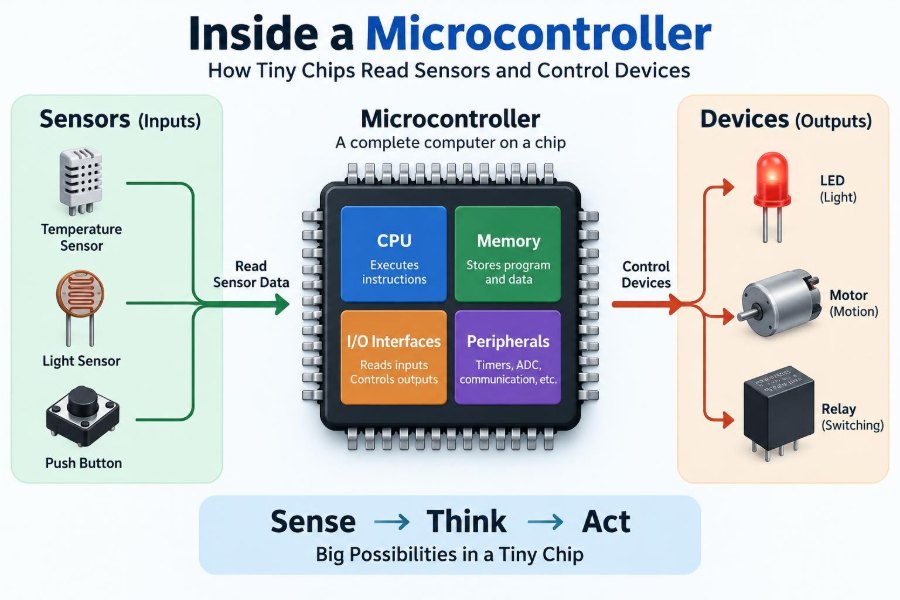

A thermostat notices that a room has become cold and starts the heating system. A washing machine decides when to open a valve, turn a motor, and drain water. A bicycle light senses darkness and switches itself on. Behind many ordinary actions is a microcontroller: a small programmable chip continuously making modest but useful decisions.
These chips do not “understand” temperature, motion, or light in the human sense. They receive electrical signals that represent those physical conditions, process the signals according to a program, and drive something in response. That simple loop is the foundation of countless embedded systems.
For students, this is where circuit theory, programming, and real hardware meet. For working engineers, understanding the path from sensor to decision to actuator helps with debugging, selecting components, managing power, and building reliable products.
Looking inside a microcontroller makes familiar devices less mysterious. More importantly, it reveals why a project can fail even when the code looks correct: the physical signal, timing, power supply, and output driver all matter.
🧠 A Microcontroller Is a Small Computer for One Job
A microcontroller unit, usually shortened to MCU, is an integrated circuit containing a processor, memory, and input/output hardware. It is designed to run a focused control task rather than the broad range of applications expected from a laptop or phone.
For example, an MCU in a digital scale may repeatedly measure a sensor, calculate weight, update a display, and sleep to save battery power. Its program is usually installed by the manufacturer and starts automatically whenever power is applied.
📦 What Lives Inside the Chip
Although packages vary from a few pins to hundreds, many MCUs share the same building blocks: a CPU, program memory, working memory, clock circuitry, digital pins, timers, communication interfaces, and often analog peripherals.
Integrating these functions reduces component count and makes a compact control board possible. It also creates constraints: the selected chip has a finite number of pins, a limited memory capacity, and specified electrical limits that must be respected.
⚙️ The CPU Executes Instructions
The central processing unit fetches instructions from program memory, decodes them, and executes operations such as addition, comparison, branching, and moving data. A program is therefore a precisely ordered set of actions, not an abstract intention.
If code says “if the measured temperature is below a threshold, enable the heater,” the CPU compares numerical values and writes a new state to an output register. The physical heater changes only because supporting circuitry translates that output state into useful power.
💾 Flash, RAM, and Nonvolatile Settings
Flash memory normally stores firmware: the program that remains after power is removed. RAM holds temporary variables, sensor readings, buffers, and stack data while the program runs.
Some MCUs also offer EEPROM or flash regions intended for settings such as calibration constants or a user preference. Writing nonvolatile memory too frequently can be problematic because these technologies have finite write endurance; a design should avoid recording every minor event permanently.
⏱️ The Clock Gives Work a Rhythm
An MCU needs a clock signal to sequence internal operations. The clock may come from an internal oscillator, an external crystal, or another timing source. Faster clocks can execute more instructions per second, but generally increase energy use and may increase electromagnetic noise.
Clock accuracy matters when timing must match another device. A decorative LED fade tolerates some variation, while serial communication, precise measurement intervals, and real-time control may require a more accurate source or careful calibration.
📌 Pins Are the Chip’s Connection Points
Package pins connect the MCU to power, ground, programming tools, sensors, and external circuits. Many pins are multiplexed: one physical pin can serve as a digital input, analog input, timer output, or communication line depending on configuration.
This flexibility is useful, but it makes pin planning an engineering task. A pin suitable for a prototype may conflict with the programming interface, lack analog capability, or be unavailable in a smaller package later.
🚪 Digital Inputs Read Two Voltage Ranges
A digital input interprets a voltage as a logical low or logical high. Exact thresholds depend on the MCU and its supply voltage, so a designer must consult the relevant datasheet rather than assuming every “3.3 V” or “5 V” signal is compatible.
A pushbutton is a common example. Pressing it can connect an input to ground, while a pull-up resistor holds the input high when the button is open. Without that resistor, the input may float: stray electrical influence can make its reading unpredictable.
🔘 Switch Bounce Is a Real Signal Problem
Mechanical contacts rarely move cleanly from open to closed. For a brief time, they may bounce between states, producing several transitions even though a person pressed the button once.
Debouncing filters this behavior. Software may wait a short, defined interval and confirm that the input remains stable; hardware may use a resistor-capacitor network or dedicated circuit. The right approach depends on response requirements and the noise environment.
🌡️ Sensors Translate Physics into Electrical Signals
A sensor is a transducer: it converts a physical quantity into an electrical output. A thermistor changes resistance with temperature, a photodiode responds to light, and an accelerometer reports motion through electronic measurements inside its package.
The MCU generally does not receive “22 degrees” directly. It receives a voltage, a current-related signal, a pulse train, or digital data. Firmware and sometimes analog circuitry convert that raw representation into a meaningful engineering value.
📈 Analog Inputs Capture More Than On and Off
Many real-world signals vary continuously. An analog-to-digital converter, or ADC, measures an input voltage and returns a number within a defined range. That number is called a digital sample.
Suppose an ADC uses a reference voltage of 3.3 V. A valid measurement represents a fraction of that reference, not automatically a calibrated physical value. To report temperature, pressure, or battery level correctly, the system needs the sensor’s transfer relationship and appropriate calibration.
🎚️ Resolution and Reference Set Measurement Detail
ADC resolution describes how many discrete codes are available. More bits divide the input range into smaller nominal steps, but do not automatically create a more accurate instrument. Sensor error, reference instability, circuit noise, and layout can dominate the result.
The reference voltage is especially significant. If it shifts, the relationship between ADC code and input voltage shifts too. A stable external reference can improve some measurement systems, while a supply-based reference can be perfectly practical when the measured signal changes proportionally with that same supply.
📣 Sampling Must Match the Signal
Sampling means taking measurements at intervals. A slowly changing room temperature can be sampled occasionally. Vibration, audio, or fast motor-current events require much faster and more deliberate sampling.
Sampling too slowly can create aliasing, where a fast signal appears as a slower, misleading pattern. Input filtering and a suitable sample rate help prevent this. The required rate depends on the signal’s useful frequency content, not simply on how quickly the MCU can run.
🧹 Noise Calls for Filtering, Not Wishful Thinking
Sensor wiring can collect interference from motors, switching regulators, radio transmitters, and mains-related fields. A single noisy sample may cause a control decision that does not represent the real system.
Useful remedies include short signal paths, a good ground arrangement, decoupling capacitors, shielding where justified, analog low-pass filters, and digital methods such as moving averages or median filters. Filtering introduces delay, so a fast safety response cannot always be heavily smoothed.
🧮 Calibration Connects Numbers to Reality
Calibration establishes the relationship between a measured signal and a known physical value. A load cell system, for instance, may record its output at zero load and at one or more known loads, then use those points to calculate displayed weight.
Calibration is not a substitute for sound hardware. It can correct repeatable offset or gain error, but it cannot fully repair a sensor that is unstable, saturated, poorly mounted, or operating outside its specified conditions.
🗣️ Digital Sensors Speak Through Protocols
Some sensors contain their own ADC and signal processing, sending data digitally over interfaces such as I²C, SPI, UART, or a one-wire-style protocol. This can reduce analog-noise concerns along the connection, but communication still has electrical and timing requirements.
| Interface | Typical strength | Common design consideration |
|---|---|---|
| I²C | Few wires and multiple addressed devices | Requires correctly chosen pull-up resistors |
| SPI | Fast, straightforward full-duplex transfers | Uses more signal lines, especially with several devices |
| UART | Simple point-to-point serial communication | Both ends must agree on framing and data rate |
A digital sensor can still return bad data if cables are too long for the environment, voltage levels are incompatible, addresses clash, or firmware ignores communication errors.
🔁 The Control Loop Turns Reading into Action
The core embedded pattern is a control loop: measure an input, decide what it means, command an output, then repeat. A thermostat compares measured temperature with a setpoint; a tank controller compares level with acceptable limits.
At its simplest, the decision is an if/else rule. More demanding systems use feedback control, in which measured output continually influences the next command. The loop’s timing, measurement quality, and actuator behavior all affect whether control is stable and useful.
🚦 Hysteresis Stops Rapid On-Off Cycling
Consider a heater that turns on whenever temperature is below 20 °C and off whenever it reaches 20 °C. Tiny sensor fluctuations near that boundary could switch the heater repeatedly.
Hysteresis uses separate switching thresholds. A hypothetical controller might turn heating on below 19.5 °C and off above 20.5 °C. This dead band reduces chatter, protects switching components, and often produces more practical behavior.
🚥 Outputs Create Logic Signals, Not Muscle
A digital output pin can set a voltage high or low, source or sink only limited current, and communicate a command to another circuit. It is appropriate for an indicator LED with a suitable resistor or a logic-level input, not for directly powering a motor, heater, solenoid, or mains appliance.
Exceeding output-current or total-port limits can damage an MCU even if the program appears to work briefly. The datasheet specifies these limits, including how output voltage changes under load.
🔌 Driver Circuits Deliver Useful Power
Actuators need driver stages. A transistor or MOSFET can let the MCU control a larger current; a relay driver can operate a relay coil; an H-bridge can reverse a DC motor. The MCU supplies the decision, while the driver handles energy transfer.
Inductive loads such as relays, motors, and solenoids store energy in magnetic fields. When switched off, they can generate a damaging voltage spike. A correctly placed flyback diode or another suitable suppression method is essential for many DC inductive-load circuits.
〰️ PWM Creates Adjustable Average Power
Pulse-width modulation, or PWM, switches an output rapidly between on and off. The duty cycle is the fraction of each period spent on. A higher duty cycle can make an LED appear brighter or deliver more average voltage-related drive to a suitable motor circuit.
PWM is not the same as a smooth analog voltage at the pin. A motor’s inertia may average the pulses mechanically, while an analog circuit may need a low-pass filter. Switching frequency should suit the load, driver, efficiency targets, and possible audible noise.
🧭 Timers Make Events Predictable
Hardware timers count clock ticks independently of the main program flow. They can generate periodic interrupts, measure pulse widths, create PWM signals, or capture the time between external edges.
Using a timer is often more reliable than repeatedly checking elapsed time in a long loop. For instance, pulse timing from a flow sensor may be measured accurately even while the CPU performs unrelated display or communication tasks.
⚡ Interrupts Handle Urgent Events
An interrupt temporarily pauses normal execution so the MCU can respond to a specific event, such as a timer overflow, received serial byte, or encoder edge. After a short interrupt service routine, normal code resumes.
Interrupts are powerful but can complicate software. Keep handlers brief, avoid slow operations inside them, and protect shared data carefully. A poorly designed interrupt routine can delay other critical tasks or create timing bugs that appear only intermittently.
🧩 Main Loops, State Machines, and Tasks
Small firmware often uses a repeating main loop. As behavior grows, a state machine makes operation clearer by defining modes such as idle, filling, heating, fault, and complete, along with the events that move the system between them.
This structure is useful for appliances and instruments because it avoids blocking delays. While a machine waits for a temperature to rise, it can still check an emergency input, update a display, and detect a communication error.
🔋 Power Design Determines Whether It Behaves Reliably
An MCU needs a supply voltage within its specified range, with a stable ground reference. Motors and radios can create current surges that pull the supply down or inject noise, causing resets, corrupted measurements, or communication failures.
Place decoupling capacitors close to power pins, follow regulator requirements, and separate high-current paths from sensitive measurement paths where practical. A development board may hide these issues; a custom board must address them deliberately.
😴 Sleep Modes Stretch Battery Life
Many battery devices spend most of their time waiting. Sleep modes stop or slow parts of the MCU, then wake it through a timer, button, or peripheral event. A remote sensor might wake, measure, transmit briefly, and return to sleep.
Low-power design involves the entire system. A sensor, voltage divider, status LED, regulator, or radio module can consume more energy than the sleeping MCU, so measuring real current in each operating state is more useful than relying on assumptions.
🛡️ Reset, Watchdogs, and Safe Startup
On power-up, the MCU resets and begins from a known program location. External circuitry may need time to stabilize, so firmware sometimes waits briefly or checks that supplies and sensors are valid before enabling outputs.
A watchdog timer resets the MCU if software stops servicing it as expected. It is a recovery tool, not a cure for flawed logic. Safety-relevant outputs should also have defined hardware-safe states, particularly during reset, programming, or a fault.
🔍 Debugging Follows the Signal Path
When a system fails, begin at the boundaries: power, ground, clock, reset, input signal, firmware decision, output pin, driver, and load. This prevents spending hours changing code when the sensor is disconnected or the actuator supply is absent.
A multimeter reveals steady voltages and continuity. An oscilloscope reveals timing, noise, ripple, PWM, and brief glitches. A logic analyzer can decode digital communication. Each tool answers a different question, so use evidence rather than guesswork.
🧪 Build and Test in Small Layers
A practical development sequence is to verify power first, blink an LED, read one input, print or display raw sensor data, validate the conversion, then test the actuator with a safe load. Integrate features gradually.
- Test the sensor across realistic low and high conditions.
- Check what happens if a cable is unplugged or data transfer fails.
- Measure supply behavior while motors or relays switch.
- Confirm that startup and reset leave outputs in a safe condition.
These tests expose assumptions that a bench demonstration may not reveal.
⚠️ Common Design Mistakes Have Physical Causes
Several recurring errors come from treating the MCU as if its pins were ideal and its code existed apart from the circuit.
- Driving a relay coil or motor directly from a GPIO pin.
- Leaving inputs floating or forgetting protocol pull-up resistors.
- Using blocking delays where responsive monitoring is needed.
- Sharing noisy motor return current with a sensitive analog measurement path.
- Ignoring voltage-level compatibility between modules.
- Assuming an ADC code is accurate without considering reference and calibration.
The solution is usually not a cleverer line of code alone. It is a better model of the electrical system and its operating conditions.
🧯 Safety Boundaries Matter
Low-voltage prototypes can still overheat components, damage batteries, or create unexpected motion. Mains-powered equipment, high-energy batteries, medical equipment, and machinery introduce hazards that require appropriate isolation, protection, enclosure design, testing, and applicable professional practices.
Do not treat a hobby-level relay module as proof that a system is safe for mains switching. Separation distances, fault behavior, connector choice, earthing, fusing, and regulatory requirements depend on the product and environment.
🏗️ Choosing an MCU Starts with the Whole System
Selecting a microcontroller is not a contest for the highest clock speed. Start with required inputs and outputs, voltage, analog performance, communication interfaces, memory, timing needs, power budget, package, development tools, availability, and expected operating conditions.
A modest MCU with well-supported peripherals can be a better choice than a powerful device whose complexity is unnecessary. Conversely, a small chip may become a liability if it lacks RAM for communication buffers or timers for the required control channels.
🧠 The Core Principle: Sense, Decide, Drive, Verify
A dependable embedded system follows a complete chain: sense the physical world with a suitable signal path, decide using firmware and well-defined timing, drive the load through appropriate power electronics, and verify behavior under realistic conditions.
The microcontroller is the coordinator, not the entire solution. Its usefulness comes from the disciplined connection of software to sensors, power supplies, communication links, drivers, and the real device being controlled.
Once you see a microcontroller as part of a complete measurement-and-control loop, tiny chips become understandable tools for solving real engineering problems. 🔌⚙️🧠