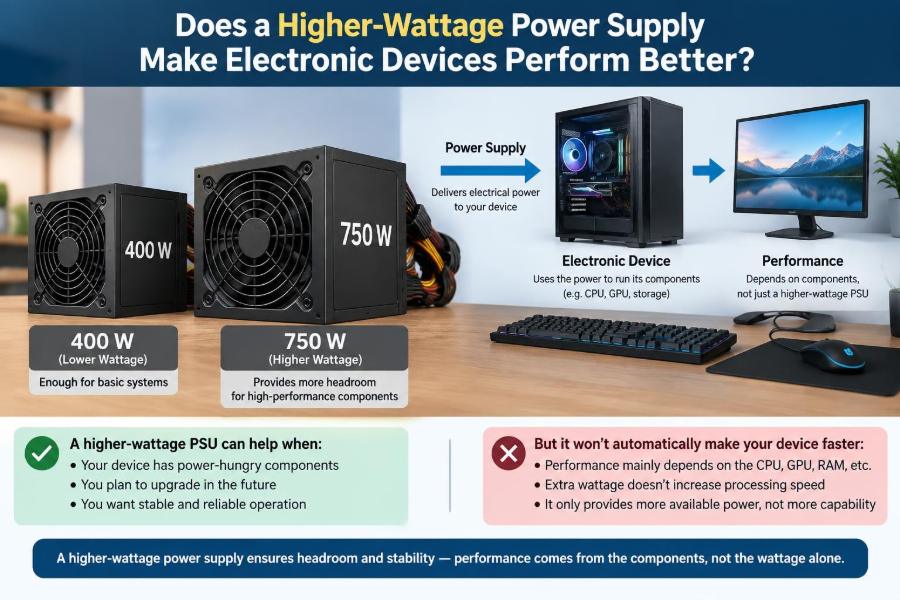

You replace a 45 W laptop charger with a 100 W model, or swap a computer’s 500 W power supply for an 850 W unit. The larger number looks reassuring. It is tempting to expect more speed, stronger performance, or perhaps a longer device life.
That expectation mixes together two different ideas: what a power supply can provide and what an electronic device will use. They are related, but they are not the same thing.
Choosing the wrong adapter can cause charging problems, instability, or damaged equipment in some situations. Choosing an oversized but compatible supply, on the other hand, is often perfectly safe—and sometimes useful—without making anything faster.
The key is learning to read wattage as a capacity rating, then checking the electrical details that determine compatibility.
⚡ The short answer: more watts do not automatically mean more performance
A higher-wattage power supply does not force extra power into a device. A properly designed device draws the current it needs, provided the supply offers the correct voltage and can deliver enough current.
Think of a power supply as a water system. Its wattage rating is closer to the maximum flow the system can support, not a command that every connected appliance must use that flow. A 100 W USB-C charger can power a small device that needs only 10 W; it does not turn that device into a 100 W load.
Performance improves only when the original supply was limiting the device or when the device can negotiate and use a higher power level.
🔢 What a watt actually measures
A watt is a unit of electrical power: the rate at which electrical energy is transferred or used. In simple DC systems, power is calculated as:
Power (W) = Voltage (V) × Current (A)A supply rated for 60 W might provide 20 V at 3 A. Another 60 W supply could provide 12 V at 5 A. Their wattage is identical, but they are not automatically interchangeable because their voltage outputs differ.
Wattage is therefore useful, but it is only one line on the label. Voltage, connector type, polarity, communication method, and protection behavior also matter.
🧲 Capacity is different from consumption
The rating printed on a power supply usually indicates its maximum continuous output under specified conditions. It describes the supply’s capability, not the power it constantly delivers.
A desktop PC with an 850 W power supply may consume far less than 850 W while browsing, and more while rendering video or gaming. The computer’s components determine the demand; the power supply meets that demand within its limits.
This distinction also explains why a large supply is not inherently wasteful. It is not continuously “pushing” its maximum wattage into the load.
🔋 Why voltage must match first
For ordinary fixed-voltage DC adapters, matching voltage is the first rule. A device designed for 12 V generally needs a regulated 12 V source, not 19 V merely because both adapters have a similar connector and adequate wattage.
Excess voltage can overstress components, generate heat, or cause immediate failure. Too little voltage can prevent startup, cause resets, or make regulators work outside their intended range.
There are exceptions, particularly USB-C Power Delivery systems that negotiate among several approved voltages. But that flexibility comes from communication between charger and device, not from wattage alone.
🧮 Current ratings: “can supply” versus “will draw”
Current is measured in amperes, or amps. A label such as “12 V, 2 A” means the adapter can supply up to 2 A at 12 V, equivalent to 24 W.
If a compatible device requires 1 A, a 12 V, 5 A adapter can normally run it safely. The adapter has spare current capacity; the device still draws about 1 A according to its circuitry and operating condition.
Using an adapter rated below the required current is riskier. It may overheat, enter protection mode, let its voltage sag, or fail prematurely. In practical selection, voltage must be correct and available current should meet or exceed the device requirement.
🔌 Connectors can look right and still be wrong
Barrel connectors are a classic source of mistakes. Two plugs may fit physically while differing in diameter, center-pin size, or polarity. A loose fit can create intermittent power, electrical arcing at the contact, or heat.
Polarity identifies which conductor is positive and which is negative. Many modern DC devices use center-positive connectors, but that is not universal. Never assume based on appearance alone.
- Check the output-voltage marking.
- Check the polarity symbol near the connector specification.
- Confirm the plug dimensions from the manufacturer or reliable documentation.
- Do not force a plug that feels loose or requires unusual pressure.
🖥️ A desktop PC is a useful example
In a desktop computer, the central processor, graphics card, drives, fans, memory, and motherboard regulators create a changing load. A power supply unit, or PSU, converts mains electricity into several DC rails used by those components.
Installing a higher-rated PSU does not increase the processor’s clock speed or the graphics card’s frame rate by itself. Those limits are set by component design, cooling, firmware, and software workload.
However, a replacement PSU can improve real-world behavior if the old one could not reliably support the system during high-load spikes. In that case, the benefit is sufficient and stable power delivery—not a direct performance boost from the larger rating.
🎮 When a PC power supply can affect performance
A severely undersized, failing, or low-quality PSU can contribute to crashes, shutdowns, or voltage instability under load. Modern graphics cards and processors may also reduce power demand or operate conservatively if the platform detects limits elsewhere.
Still, performance troubleshooting should be evidence-led. Thermal throttling, outdated drivers, a CPU bottleneck, insufficient memory, and storage problems are often more likely explanations than PSU wattage.
A larger PSU is justified when adding a more demanding graphics card, additional drives, or expansion hardware, or when calculations show the existing unit lacks appropriate headroom. It is not a universal upgrade for a slow PC.
📏 Why quality matters beyond the wattage label
Two units with the same wattage rating can differ substantially in voltage regulation, ripple, thermal design, component quality, noise, and protection circuits. Ripple is unwanted small variation on a DC output; excessive ripple can make life harder for sensitive electronics.
For desktop systems, useful protections commonly include over-current, over-voltage, under-voltage, short-circuit, and over-temperature protection. Their presence and correct implementation matter more than an impressive number printed in large type.
Choose reputable, appropriately specified equipment rather than treating wattage as the sole quality indicator. A realistic continuous rating from a sound design is more meaningful than a questionable peak claim.
🌡️ Efficiency changes heat and electricity use
Power supplies are not perfectly efficient. They consume input power and convert most—but not all—of it into useful output power. The remainder becomes heat.
Efficiency varies with load, design, input voltage, and temperature. A higher-wattage unit is not automatically more efficient for a particular device. Some supplies operate most efficiently around a middle portion of their rated load, but the exact curve varies by model.
An oversized supply can run cool and quietly at a light load, yet a sensibly sized high-quality supply may be equally or more efficient. Check measured efficiency information where it is available instead of relying on capacity alone.
📈 Headroom is useful, but excess has limits
Headroom is capacity beyond expected normal demand. It helps a supply handle brief load changes, component aging, warm environments, and future upgrades without operating continuously at its limit.
For a PC, headroom should also account for the graphics card’s recommended supply capacity and the connectors it requires. For an adapter, it means selecting one that can meet the device’s stated current or wattage requirement.
But extreme oversizing is rarely necessary. A 1,500 W PSU for a modest office computer generally adds cost and may not offer a practical benefit over a well-made, appropriately rated alternative.
🧠 Transient loads explain some confusing failures
Electronic loads do not always draw smooth, constant power. A processor or graphics card can change its demand rapidly as workload changes. These short changes are called transients.
A capable PSU must respond without allowing output voltages to move outside acceptable limits. This is one reason a system that appears fine during light work can restart when a game, renderer, or stress test begins.
Wattage alone does not fully describe transient behavior. Design quality, control circuitry, cabling, connector ratings, and component-specific requirements all contribute.
💻 Laptop chargers use power negotiation
Many laptops use USB-C Power Delivery, commonly called USB-C PD. Charger and device communicate to select an allowed voltage and current profile. The charger advertises what it can provide, and the laptop requests a suitable option.
A higher-power USB-C charger can be useful if it supports the profiles your laptop needs. A 100 W charger may charge a compatible laptop at its intended rate while also leaving capacity for a dock or peripherals.
But a 240 W-capable charger does not make a laptop charge beyond its designed limit. The battery-management system, cable, thermal conditions, and firmware govern the charging rate.
🧵 USB-C cables are part of the power path
The charger and device may be compatible while the cable is not. USB-C cables have different current capabilities, construction quality, and data features. At higher power levels, the cable may need electronic identification, often called an e-marker, to communicate its capability.
A weak, damaged, or unsuitable cable can limit charging power, become warm, or lead to unreliable connections. It can also be difficult to identify capability from appearance alone.
Use cables rated for the intended charging level from reliable sources. Avoid treating every USB-C cable as electrically equivalent simply because the connectors match.
📱 Phones deliberately control their charging rate
A phone’s charger supplies available power, but the phone’s charging controller decides how much to take. Battery charging is carefully managed to control temperature, battery voltage, and current as the battery fills.
Fast charging may require a supported protocol, compatible cable, and suitable thermal conditions. If any piece is missing, the phone usually falls back to a lower charging mode.
This is why a large charger may be handy for sharing among devices yet make no visible difference to a phone that already reaches its maximum supported charging rate with a smaller charger.
🔄 Fast-charging names are not universal guarantees
Terms such as “fast charge” describe a broad goal rather than one universal electrical standard. Different manufacturers and ecosystems may use different protocols, voltage steps, current limits, and cable requirements.
USB-C PD offers a widely used framework, but even PD chargers have different maximum profiles. A charger’s total wattage does not guarantee that it offers the exact profile a device wants.
Read the small output table on the charger, not just the headline wattage. A compatible profile matters more than the largest number in the product name.
🛜 Routers, monitors, and small appliances need exact matching
Network routers, LED controllers, external drives, speakers, and similar equipment often use barrel-jack adapters. These devices are less likely than USB-C products to negotiate voltage automatically.
For example, a 12 V device needing up to 1.5 A can generally use a regulated 12 V, 2 A adapter with the correct connector and polarity. A 9 V, 3 A adapter has sufficient wattage potential but the wrong voltage.
Small appliances also have startup loads. A motor, relay, or hard drive may briefly demand more current than its steady-state figure suggests, so the manufacturer’s recommendation should take priority over rough arithmetic.
🧪 Bench power supplies work differently
Laboratory bench supplies allow users to set voltage and impose a current limit. This makes them valuable for testing circuits, but it also creates opportunities for error.
Set the voltage to the circuit’s required value before connecting it. Set a sensible current limit so an assembly fault does not receive unrestricted current. The supply may enter constant-current mode when that limit is reached, causing the output voltage to fall.
A high-current bench supply does not automatically harm a low-current circuit if voltage and connections are correct. Yet its available fault current means careful setup and monitoring are especially important.
🛡️ Protection circuitry is a safety net, not permission to experiment
Good supplies may shut down or limit output during a short circuit, overload, or overheating event. These features reduce risk, but they are not guarantees that every wiring mistake is harmless.
Protection thresholds can differ between designs, and a device connected downstream may be damaged before a supply responds. Batteries and large capacitors can also store energy independently of the supply.
Disconnect power before changing wiring, use appropriately rated connectors and wire, and do not bypass fuses or safety features to “see if it works.”
🔥 Mains-side power is a separate safety issue
Power supplies connected to wall outlets contain hazardous mains voltages and may retain charge in capacitors after unplugging. Their internal repair should be left to trained people using suitable procedures and equipment.
The device-side output may be low voltage, but the input side is not. Never assume a metal enclosure, damaged cable, or exposed connector is safe because an adapter has a modest output rating.
For replacement adapters, verify the input range if equipment will be used in another region. Input compatibility is separate from the DC output specification.
🏷️ How to read an adapter label
Most adapter labels provide enough information for a first compatibility check. Look for the word “Output,” not just “Input.” Output may be written as a set of voltage/current pairs or as a voltage followed by maximum current.
| Label item | What it tells you | What to compare |
|---|---|---|
| Output voltage | The voltage delivered to the device | Must match for fixed-voltage equipment |
| Maximum current | The most current it can supply at that output | Must meet or exceed device demand |
| Wattage | Total output power capacity | Must be adequate, but is not enough alone |
| Polarity and connector | How power reaches the device | Must match physically and electrically |
| Supported profiles | Negotiated USB-C or other modes | Must include a suitable device profile |
🧾 The device label is the starting point
Check the original adapter, the device label, its manual, or the manufacturer’s documented specification. The original adapter often states the intended output requirement clearly.
Do not confuse an adapter’s input rating with its output rating. “100–240 V AC input” describes what it accepts from the wall; it does not mean it delivers that voltage to the device.
When documentation is unclear, replacing the adapter with an exact approved model is often safer than guessing based on connector fit or wattage.
⚖️ A practical compatibility checklist
Before using a higher-wattage replacement, work through the relevant details in order:
- Identify whether the device uses fixed DC power, USB-C PD, a proprietary charger, or an internal PSU.
- Match required output voltage, unless an approved negotiation standard handles it.
- Ensure the supply’s current and wattage capacity are sufficient.
- Match connector shape, size, polarity, and pinout.
- For USB-C, confirm charger profiles and cable capability.
- Choose a reputable supply with appropriate safety approvals for your region and application.
If one of these is uncertain, pause rather than treating the larger wattage number as proof of compatibility.
🚫 Common mistake: matching watts while ignoring volts
Suppose a device requires 12 V at 2 A, which is 24 W. A 24 W adapter rated at 24 V and 1 A has the same wattage but the wrong voltage. It is not an equivalent replacement.
The same mistake appears in reverse: a 5 V, 10 A USB supply has 50 W of potential, but it cannot necessarily replace a device designed to receive 20 V through USB-C PD.
Electrical compatibility is a set of conditions, not a single wattage comparison.
🚫 Common mistake: assuming a bigger PC PSU fixes every problem
Replacing a computer PSU can be sensible if it is old, inadequate, defective, or incompatible with a hardware upgrade. But it should follow diagnosis, not substitute for it.
If a system slows down after several minutes of work, inspect temperatures and cooling. If only one application is slow, examine software settings and resource use. If crashes occur under load, review event information, cables, memory stability, and GPU requirements alongside the PSU.
A methodical diagnosis saves money and avoids masking the actual fault.
🚫 Common mistake: confusing charger power with battery health
A higher-wattage charger may reduce charging time only if the device supports a higher input rate and all compatibility conditions are met. It cannot restore capacity lost through battery aging or damage.
Battery health depends on chemistry, temperature exposure, charge cycles, storage conditions, and device management. Charging behavior may also slow near full charge by design.
If a device charges slowly despite a compatible charger, excessive heat, a worn cable, debris in the port, battery condition, or background power use may be relevant factors.
🔧 When upgrading the supply is genuinely worthwhile
A higher-capacity supply makes sense when it solves a defined requirement. Typical cases include a workstation receiving a more demanding GPU, a laptop dock powering several accessories, or a USB-C charger shared among devices with known compatible profiles.
It may also be worthwhile for reliability when the existing supply is operating near its practical limit, has inadequate connectors, or is a low-quality unit with poor regulation and protection.
The best upgrade is not simply “more watts.” It is adequate, compatible, well-built power with reasonable headroom.
🌿 Right-sizing reduces unnecessary compromises
Right-sizing means selecting a supply that meets expected demand, has appropriate margin, and suits the intended environment. This balances cost, physical size, cooling, efficiency behavior, and future flexibility.
For portable equipment, a higher-power charger may be larger and heavier. For a quiet PC, a quality PSU with a suitable fan profile can matter more than excess capacity. For embedded projects, regulation accuracy and protection may dominate the decision.
There is no single ideal wattage without knowing the load and use case.
🧰 Build a habit of checking specifications
Developing the habit of reading labels prevents many avoidable problems. Start with voltage, then current or wattage, then connection details. For negotiated systems, look for supported modes rather than assuming the largest advertised value will be available.
For critical equipment, use original or manufacturer-approved supplies where practical. For engineering work, document the assumed load, expected peak conditions, cable lengths, and safety margins instead of making decisions from a nominal power figure alone.
That discipline scales from charging a phone to designing a power distribution system.
✅ The core principle: devices pull power; supplies provide capacity
A power supply’s wattage is best understood as its ability to support a load, not a performance setting. A device determines its own power draw through its circuitry, firmware, workload, and—in modern charging systems—its negotiated charging rules.
More available wattage can prevent shortages, support expansion, and improve reliability when the existing supply is inadequate. It does not automatically raise processor speed, frame rate, battery capacity, or charging speed.
The dependable decision process is simple: match the voltage and connection, provide sufficient current and power, verify protocol compatibility where applicable, and value construction quality and safety features alongside the rating.
A higher-wattage supply helps when it is compatible and fills a real power requirement; otherwise, it is simply unused capacity. 🔌⚡🛠️